
The developers assume "We already checked this on the server. It's fine." But here's the thing; what if the server and the browser don't agree on what the input actually says?
That question lived in my head for a while. Eventually, I decided to turn it into a challenge. On February 8th, I published it on my X account for anyone brave enough to give it a shot. The challenge was 20 lines of Node.js code. It looked simple and had two completely different solutions.
Thanks to everyone who participated and tried to crack it. Now, let's break the whole thing down together, from the source code, all the way to the final exploit.
Reading the Challenge Source Code
The first step in any challenge is to read the code carefully. Not skim it. Actually read it. Let's go line by line. Here's the entire challenge:
const express = require('express');
const app = express();

app.set('query parser', 'extended');

app.get('/', (req, res) => {
  const redirectUri = req.query.redirect_uri;

  if (!redirectUri) {
    return res.send("redirect_uri is required");
  }

  if (redirectUri !== "https://pwnbox.xyz/docs") {
    return res.send("Invalid redirect_uri");
  }

  return res.send(`
    <script>
      location = new URLSearchParams(window.location.search).get("redirect_uri");
    </script>
  `);
});

app.listen(3000, () => console.log('Listening on port 3000'));
That's it. It may seem simple, but there's more under the hood. Let me break down what each part does.
The Framework
The app is built with Node.js and Express.js. Nothing unusual here; Express is one of the most popular web frameworks in the Node ecosystem. Millions of applications use it every day.
The Query Parser Setting
This line is easy to skip over, but it's actually one of the most important lines in
the entire challenge. We'll come back to it soon. For now, just remember: when
Express is told to use the extended query parser, it switches from the
basic built-in parser to a library called qs. This library is much more
powerful; it can handle nested objects, arrays, bracket notation, and all kinds of
fancy stuff.
Keep that in the back of your mind. It matters. A lot.
The Route Logic
The application has a single route; the root path /. When you visit it, here's what happens:
- Extract the parameter: It grabs
redirect_urifrom the parsed query string. - Check if it exists: If there's no
redirect_uriat all, you get the messageredirect_uri is required. - Strict validation: If
redirect_uriis not exactly equal tohttps://pwnbox.xyz/docs, you getInvalid redirect_uri.This uses!==, JavaScript's strict inequality operator. The value must be that exact string, character for character. - Render the page: If (and only if) the check passes, the server sends back an HTML page containing a small inline script.
The Inline Script
This is where the second parser comes to challenge:
<script>
  location = new URLSearchParams(window.location.search).get("redirect_uri");
</script>
This script runs in the browser, not on the server. It does the following:
- Takes
window.location.search, the raw query string from the browser's address bar - Parses it using
URLSearchParams, the browser's built-in query string parser - Gets the value of
redirect_uri - Sets
locationto that value, which causes the browser to navigate to it
The developer's intention is clear: the backend already verified that
redirect_uri is https://pwnbox.xyz/docs, so the browser
should just redirect there. Safe and simple. Right?
Spotting the Crack
Okay, so let's think about this like an attacker. What do we control? We control the URL; specifically, the query string. Our input flows into two places:
- The backend: Express parses the query string using
qsand checks the value - The frontend: The browser parses the same query string using
URLSearchParamsand uses the value
Here's the critical question: What if these two parsers read the same query string but come up with different answers?
If we could somehow make the backend see
redirect_uri = "https://pwnbox.xyz/docs" (to pass the check) while the
browser sees redirect_uri = "javascript:alert(origin)" (to trigger XSS),
we would win.
Sounds impossible? Let's see. To find our exploit, we need to understand exactly how each parser works.
How Express Uses the qs Library
Before we dive into qs itself, let's quickly trace how Express use it.
This context helps us understand what options are being used, which turns out to be
important.
When you access req.query, Express lazily gets the raw query string and
runs it through the parser function. That function was set up by
compileQueryParser:
exports.compileQueryParser = function compileQueryParser(val) {
  var fn;

  if (typeof val === 'function') {
    return val;
  }

  switch (val) {
    case true:
    case 'simple':
      fn = querystring.parse;
      break;
    case false:
      break;
    case 'extended':
      fn = parseExtendedQueryString;
      break;
    default:
      throw new TypeError('unknown value for query parser function: ' + val);
  }

  return fn;
}
When the value is 'extended', it selects the
parseExtendedQueryString function. Let's see what that does:
function parseExtendedQueryString(str) {
  return qs.parse(str, {
    allowPrototypes: true
  });
}
So Express calls qs.parse() with a single non-default option:
allowPrototypes: true. Everything else uses qs defaults.
This means the following default settings are active:
- depth: 5 (maximum nesting level)
- arrayLimit: 20 (maximum array index)
- delimiter:
'&'(what separates parameters) - parameterLimit: 1000 (maximum number of parameters to parse)
- allowPrototypes:
true(the only non-default)
One of these defaults, parameterLimit, will turn out to be critical.
But we'll get there.
Inside the qs Parser, A Deep Dive
This is where things get really interesting. The qs library parses
query strings in a pipeline of steps. Let's walk through each one, because the
exploit hides inside specific steps.
Step 1: Entry Point and Options
When qs.parse(str, options) is called, it first normalizes the options.
A function called normalizeParseOptions merges whatever you passed in
with the defaults, validates everything, and prepares for parsing. Nothing exciting
here; just setup work.
Step 2: Split the String into Key/Value Pairs
The parser takes the raw query string and splits it by the delimiter (which is & by default).
var parts = cleanStr.split(options.delimiter, options.parameterLimit);So a query string like:
name=alice&age=30&city=tokyoGets split into three parts:
["name=alice", "age=30", "city=tokyo"]
Still straightforward. But here's the first important detail: qs only
processes up to parameterLimit parts. The default limit is 1000. If
your query string has 1500 parameters separated by &,
qs will only look at the first 1000 and silently ignore the rest.
Step 3: Finding the = Separator, Critical for Solution 1
For each part, the parser needs to figure out where the key ends and the value
begins. You'd think this is simple; just find the first = sign.
Everything before it is the key, everything after it is the value.
That's how URLSearchParams works. Simple, predictable, no surprises.
But qs was designed to handle complex bracket notation like
user[name]=alice or items[0]=apple. Because of this, it has
a special rule for finding the = separator. Here are
the lines of code that make our first exploit possible:
for (i = 0; i < parts.length; ++i) {
    part = parts[i];

    var bracketEqualsPos = part.indexOf(']=');
    var pos = bracketEqualsPos === -1
        ? part.indexOf('=')       // Normal: use the first '='
        : bracketEqualsPos + 1;   // Bracket: use the '=' AFTER ']'

    var key, val;
    if (pos === -1) {
        key = options.decoder(part, defaults.decoder, charset, 'key');
        val = options.strictNullHandling ? null : '';
    } else {
        key = options.decoder(part.slice(0, pos), defaults.decoder, charset, 'key');
        val = options.decoder(part.slice(pos + 1), defaults.decoder, charset, 'value');
    }

    // ...store the key/value pair...
}
In plain English:
- First,
qssearches for the sequence]=anywhere in the string - If
]=is not found, it falls back to normal behavior; split at the first= - If
]=is found, it uses the=that comes right after the]as the split point
But here's the thing, the code doesn't check whether ]= is in a
reasonable position. It just searches the entire string. If ]= appears
somewhere in what a human would consider the value, qs doesn't care.
It still uses that = as the split point. The ]= has more
priority than = sign, always.
Steps 4 and 5: Nesting and Merging, Critical for Solution 2
After splitting each part into a key and value, qs processes the keys further.
var parseKeys = function parseQueryStringKeys(givenKey, val, options, valuesParsed) {
    if (!givenKey) {
        return;
    }

    var keys = splitKeyIntoSegments(givenKey, options);

    if (!keys) {
        return;
    }

    return parseObject(keys, val, options, valuesParsed);
};
If a key contains bracket notation, qs decomposes it into segments. Here's the behavior:
Key: "[redirect_uri]"  →  Segments: ["[redirect_uri]"]
Key: "a[b][c]"         →  Segments: ["a", "[b]", "[c]"]
Build nested objects (inside-out): The function
parseObject takes the chain and builds the object from the inside out,
starting with the innermost segment:
chain = ["a", "[b]", "[c]"], value = "1"

Step 1 (i=2): key = "c"   →  { c: "1" }
Step 2 (i=1): key = "b"   →  { b: { c: "1" } }
Step 3 (i=0): key = "a"   →  { a: { b: { c: "1" } } }

---

chain = ["[redirect_uri]"], value = "https://pwnbox.xyz/docs"

Step 1 (i=0): key = "redirect_uri"   →  { redirect_uri: "https://pwnbox.xyz/docs" }
Notice the second example. [redirect_uri] with brackets gets treated
as a property called redirect_uri. The brackets are stripped. So in the
final req.query object, [redirect_uri]=value and
redirect_uri=value both end up setting req.query.redirect_uri.
But URLSearchParams? It doesn't know about bracket notation at all. To
URLSearchParams, the key [redirect_uri] is literally the
string [redirect_uri]; brackets included. It's a completely different
key from redirect_uri.
There's our second parser differential :)
Step 6: Merge and Compact
Each key/value pair produces its own small nested object. These get deep-merged
together using utils.merge(), and sparse arrays get cleaned up by
utils.compact():
var tempObj = typeof str === 'string' ? parseValues(str, options) : str;
var obj = options.plainObjects ? Object.create(null) : {};

var keys = Object.keys(tempObj);
for (var i = 0; i < keys.length; ++i) {
    var key = keys[i];
    var newObj = parseKeys(key, tempObj[key], options);
    obj = utils.merge(obj, newObj, options);
}

return utils.compact(obj);

// For example: { a: { b: "1" } }  +  { c: "2" }  →  merge()  →  { a: { b: "1" }, c: "2" }
One important behavior during merging is if two parameters have the same key,
qs combines them into an array. So
redirect_uri=foo&redirect_uri=bar produces
{ redirect_uri: ["foo", "bar"] }.
Understanding the Browser's Parser
Before we build our exploits, let's quickly cover how URLSearchParams
works. It's refreshingly simple compared to qs:
- Strip the leading
?if present - Split the string on
& - For each part, split at the first
=; everything before it is the key, everything after it is the value - No bracket notation. No nesting. No depth limits. No parameter limits.
[foo]is literally the key[foo] - When
.get(key)is called with a key that appears multiple times, it returns the first match
That's it. No special rules. No ]= priority. No bracket stripping. What
you see is what you get.
Now we have all the pieces. Let's build some exploits.
Solution 1: The ]= Priority Trick
Let's go back to that ]= rule we found in qs. Remember, if
qs sees ]= anywhere in a string, it uses that =
to split key from value, not the first one. What if we use this against it?
Here's the idea. What if we put ]= somewhere inside a value that also
starts with redirect_uri=? The browser would split at the first
= and think the key is redirect_uri. But qs
would skip that first =, find our ]= later in the string,
and split there instead. Same string. Two different split points. Two different
keys.
Let's try it. Here's the payload:
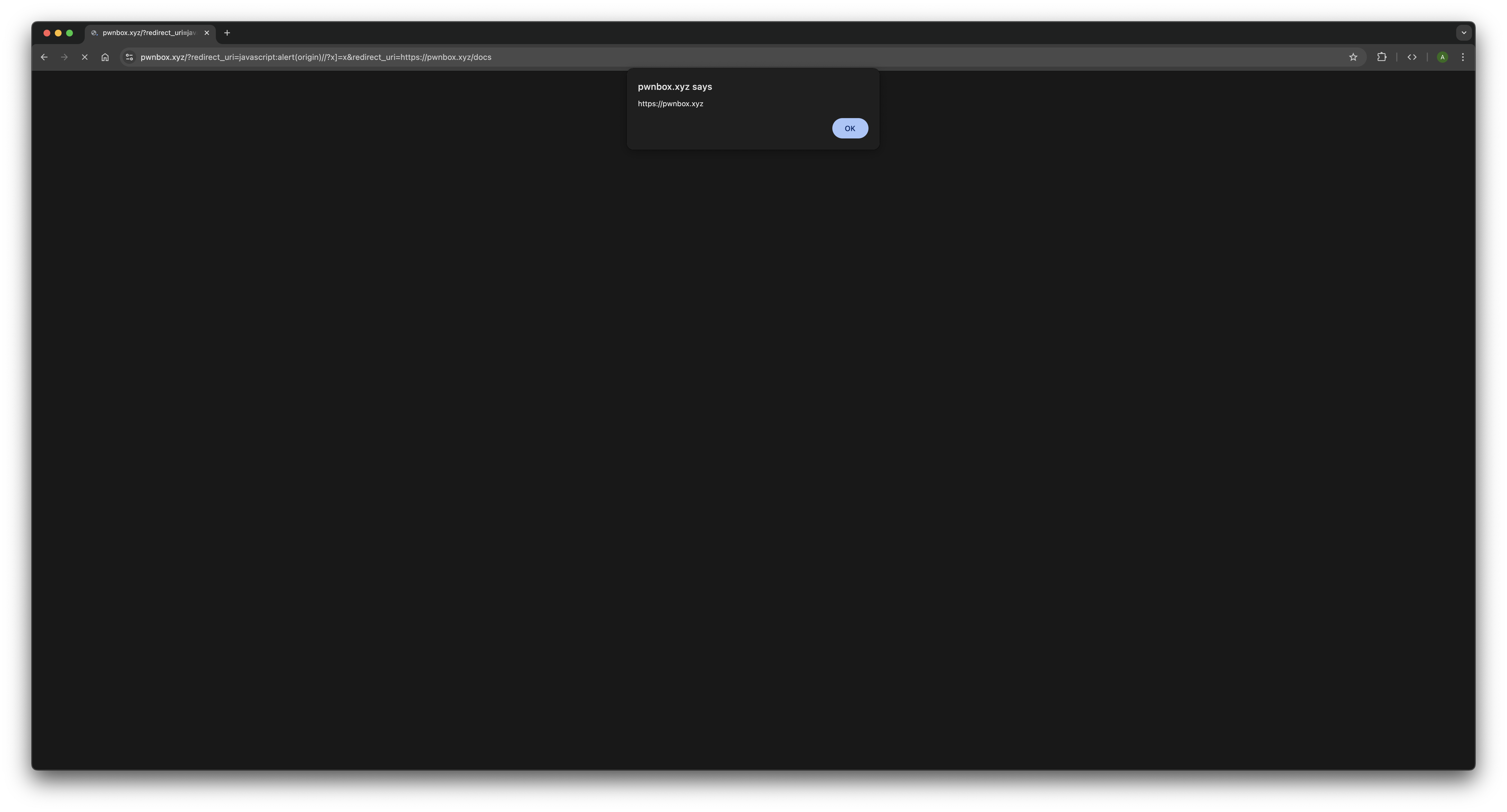
/?redirect_uri=javascript:alert(origin)//?x]=x&redirect_uri=https://pwnbox.xyz/docsWe have two parameters. Let's see what each parser does with them, starting with the backend.
What qs sees?
qs splits on & and picks up the first part:
redirect_uri=javascript:alert(origin)//?x]=x.
Now it needs to find the = that separates the key from the value. So it
searches for ]= first. And it finds one; the x]=x at the
end.
- qs decides the real
=is the one after] - That means everything to the left (
redirect_uri=javascript:alert(origin)//?x]) becomes the key - And
xbecomes the value
Wait, what? The whole thing became a key? Yes. One giant, weird, meaningless key.
And importantly: this has nothing to do with redirect_uri anymore. It's
just some random property name in req.query that nobody will ever
reference.
Then qs moves to the second part:
redirect_uri=https://pwnbox.xyz/docs. No ]= in here, so it
uses the first = like normal.
- Key =
redirect_uri - Value =
https://pwnbox.xyz/docs
So after all that, req.query.redirect_uri is
"https://pwnbox.xyz/docs". The backend runs its !== check,
everything matches, validation passes. The server is happy. It sends the page back
to the browser.
What the browser sees?
Now the browser runs the inline <script>.
URLSearchParams gets the same query string. But it doesn't know
anything about ]=. It just splits at the first =, always.
First part: redirect_uri=javascript:alert(origin)//?x]=x
- Key =
redirect_uri - Value =
javascript:alert(origin)//?x]=x
Second part: redirect_uri=https://pwnbox.xyz/docs
- Key =
redirect_uri - Value =
https://pwnbox.xyz/docs
Now the code calls .get("redirect_uri"). There are two matches;
.get() returns the first one, which is
javascript:alert(origin)//?x]=x.
The browser sets location to this string. It starts with
javascript:, so the browser runs everything after
javascript: as code. So it evaluates:
alert(origin)//?x]=x. The alert box pops up and XSS achieved.
That's Solution 1. Short payload, two parameters, and the whole thing works because
qs gives ]= more priority than = when
deciding where to split.
Solution 2: Bracket Stripping + Parameter Limit Trick
This solution takes a completely different road. We're not going to touch the
]= splitting logic at all. Instead, we're going to abuse two other
things about qs, how it handles brackets, and how many parameters it's
willing to read.
Let's start with the bracket thing.
Remember how qs supports bracket notation?
If you send user[name]=alice, qs strips the brackets and builds
{ user: { name: "alice" } }.
There's also a simpler case, If you send
[redirect_uri]=https://pwnbox.xyz/docs, qs strips the brackets and
treats the key as redirect_uri.
But the fun part is URLSearchParams has no idea what brackets mean. To
the browser, [redirect_uri] is just the key [redirect_uri];
brackets included. That's a different key from redirect_uri, so when
the browser later calls .get("redirect_uri"), this parameter simply
doesn't match.
So we can feed the safe value to the backend using [redirect_uri]. The
backend is happy; the browser ignores it. Half the job done.
Now we need to deliver javascript:alert(origin) to the browser. The
obvious idea: just add a normal redirect_uri=javascript:alert(origin).
But… problem:
qssees both[redirect_uri]=safeandredirect_uri=javascript:alert(origin)- It strips brackets from the first one
- Now we have two keys with the same name →
qsmerges them into an array - That turns
req.query.redirect_uriinto:["https://pwnbox.xyz/docs", "javascript:alert(origin)"] - That's an array, not a string → backend rejects it
So we need the backend (qs) to never see the malicious redirect_uri.
How do we hide it? Using the parameter limit! qs has a default
parameterLimit of 1000. It splits the query string on
&, processes only the first 1000 parts and
Everything after that? Silently ignored without any errors or
warnings.
URLSearchParams has no limit. It reads everything.
So the plan:
- Put the safe
[redirect_uri]=https://pwnbox.xyz/docsfirst - Add 1000 junk parameters (like
&prepeated 1000 times) to exhaust qs -
Put the malicious
redirect_uri=javascript:alert(origin)after the limitqsnever sees it- The browser does
Payload:
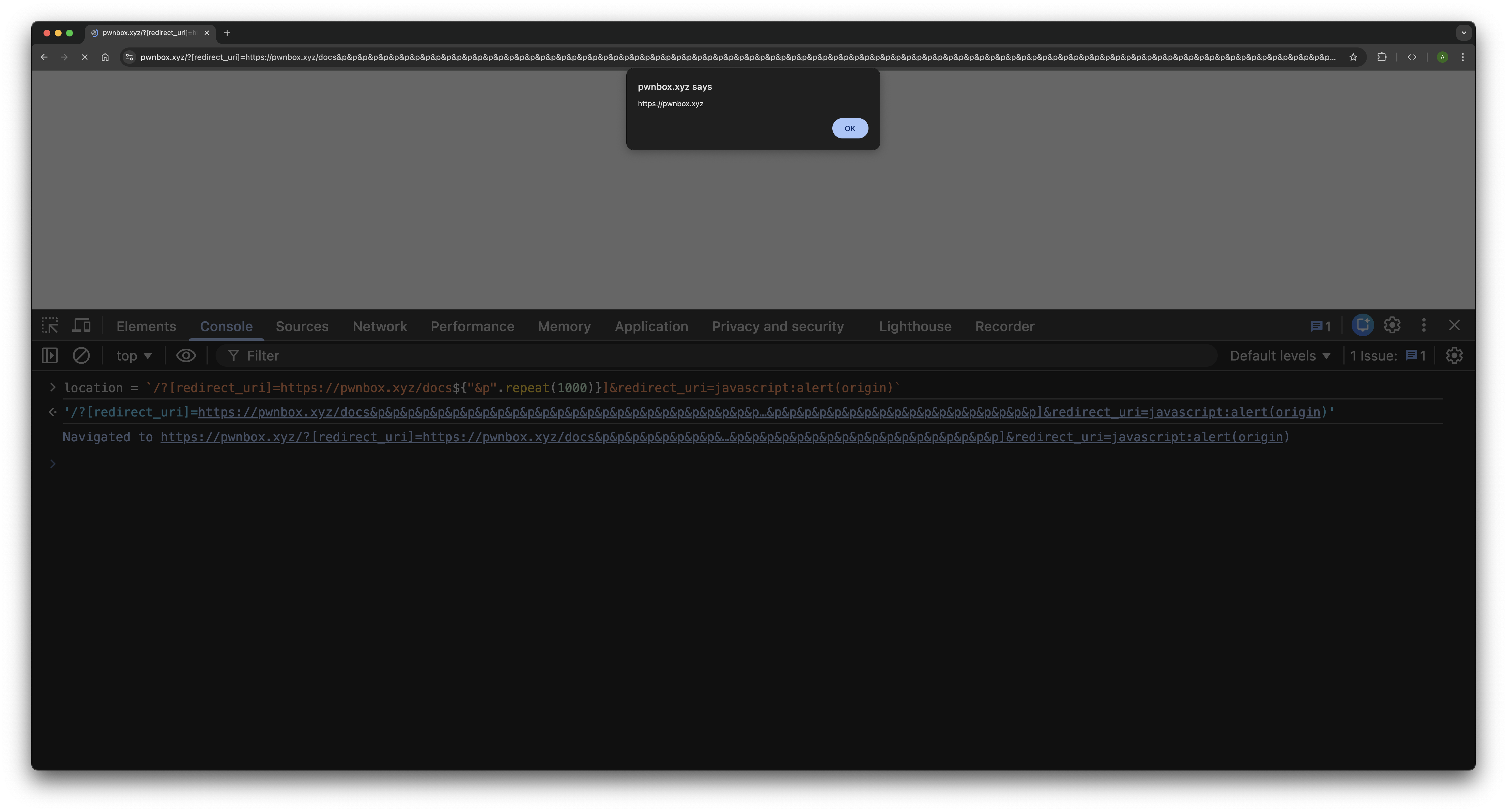
/?[redirect_uri]=https://pwnbox.xyz/docs&p&p&p...(×1000)...&p&redirect_uri=javascript:alert(origin)What qs sees?
- It processes the first part:
[redirect_uri]=https://pwnbox.xyz/docs→ strips brackets → setsredirect_urito the safe value. - It then processes ~1000 dummy
pparameters, filling its parameter budget. - It reaches the parameter limit (1000) and stops reading the query string.
- The final
redirect_uri=javascript:alert(origin)is never seen by qs. - Result:
req.query.redirect_uristays"https://pwnbox.xyz/docs"and backend validation passes.
What the browser sees?
- URLSearchParams reads the entire query string with no limit.
- It stores
[redirect_uri]literally as the key"[redirect_uri]"(notredirect_uri). - It stores the 1000
pparameters normally (irrelevant). - It eventually reaches
redirect_uri=javascript:alert(origin)at the end. .get("redirect_uri")returns the malicious value.- Browser sets
locationto it → executesjavascript:alert(origin)→ XSS achieved.
Why This Matters in the Real World
You might be thinking: "Cool CTF challenge, but does this pattern actually show up in real applications?"
Yes. More often than you'd expect.
The redirect_uri parameter in our challenge isn't a coincidence; it
mirrors real OAuth and SSO implementations. In those flows, the server validates
that the redirect URI is on an approved allow-list, then either a server-side
redirect or a client-side script handles the actual navigation. If the validation
and the redirect use different parsers, the same class of attack applies.
Many modern Single Page Applications have server-side middleware that validates
query parameters before the page loads, but the client-side JavaScript reads those
same parameters directly from window.location to decide what to render
or where to navigate. The server and the client are both looking at the URL, but
they might not be reading it the same way.
The core vulnerability in all these cases is a trust boundary violation. The server trusts its parser. The client trusts its parser. Nobody checks whether both parsers actually agree. And as we've seen, there are multiple ways for them to disagree. It's not just one quirk you can patch; it's a fundamental problem with the "validate server-side, use client-side" pattern whenever different parsers are involved.
Epilogue
When I designed this challenge, I was mainly thinking about the bracket stripping
and parameter limit approach. But when people started finding the ]=
priority trick, it made the challenge even more interesting. Two completely
different techniques, targeting different behaviors of the same library, both
achieving the exact same result.
It's a perfect illustration of how parser differentials work in practice. The gap between two parsers isn't a single crack; it's a whole surface of potential disagreements. Each quirk, each special case, each default option that differs between them is a potential entry point.
The next time you're reviewing code, auditing an application, or building something yourself; and you see a backend validation followed by a client-side action on raw input; pause. Take a breath. And ask two questions: "Do these two parsers agree?" And if they don't "In how many ways do they disagree?", The answers might surprise you.
Happy hunting. 🎯